Office 365 SMTP settings and limits for cold email (2026)
Office 365 SMTP settings (smtp.office365.com, port 587), Microsoft 365 prices from $4 a user, and the 2026 sending limits that decide cold email volume.
Microsoft 365 at a glance
Facts checked Oct 8, 2026 on microsoft.com
- Price
- From $4 per user per month for Exchange Online Plan 1 billed yearly; Microsoft 365 Business Basic $7, or $5.40 without Teams
- Pricing model
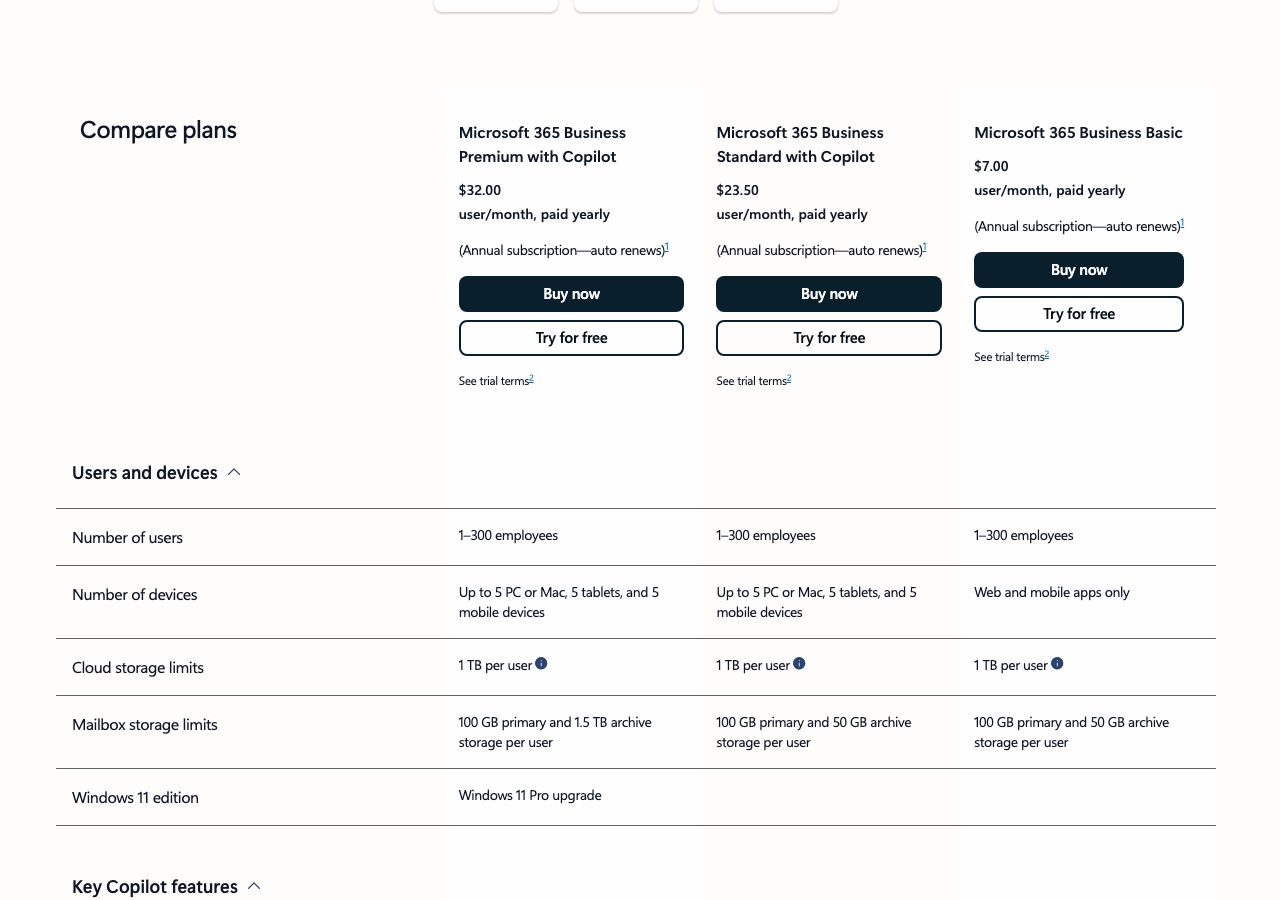
- Per user per month on an annual subscription that renews automatically, in US dollars before tax. Exchange Online Plan 1, a 50 GB mailbox with no Office apps, is $4 a user a month paid yearly, and Plan 2 is $8. Microsoft 365 Business Basic, which adds a 100 GB mailbox, web and mobile Office apps and Teams, is $7, or $5.40 in the version without Teams. Business Standard with Copilot is $23.50, or $20.30 without Teams, and Business Premium with Copilot is $32, or $28.80 without Teams. Business plans cover up to 300 users. There is a one-month free trial that needs a card and converts to a paid subscription, and once a paid subscription starts you have 7 days to cancel for a prorated refund.
- Minimum order
- One user
- Free trial
- One month free on Business plans, card required, converting to a paid subscription unless cancelled
- Billing
- Annual subscription paid yearly, renewing automatically; cancel within 7 days of the paid subscription starting for a prorated refund
- Mailbox types
- Microsoft 365
- Setup time
- An hour or more per tenant by hand: verify the domain, add the DNS records, create users, enable SMTP AUTH or connect over OAuth
- DNS setup
- You add Microsoft's MX, SPF and DKIM records and your own DMARC record at your DNS host
- IP location
- Microsoft's shared Exchange Online outbound infrastructure; no dedicated IPs
- Warmup
- Not offered; new tenants get 10% of their outbound quota for 30 days and 25% until day 60
- Replacements
- Not applicable; mailboxes that trip Microsoft's outbound spam limits are blocked from sending until an admin releases them
- Domains
- Bring your own; the default onmicrosoft.com domain is held to 100 external recipients a day per organisation
- Integrations
- SMTP AUTH (smtp.office365.com, port 587), OAuth 2.0 for SMTP, IMAP and POP, Microsoft Graph, Outlook desktop, web and mobile, Sequencers via OAuth
Best for: Senders who want Microsoft mailboxes under their own admin control and can configure tenants, DNS and OAuth themselves.
Not for: Anyone hoping to send bulk volume from a few mailboxes, or teams that want inboxes delivered ready to send.

Microsoft 365 pricing
Published prices as of Oct 8, 2026 from their pricing page. Prices change; check before you buy.
| Plan | Price | What you get | Notes |
|---|---|---|---|
| Exchange Online Plan 1 | $4 a user a month | 50 GB mailbox plus 50 GB archive, no Office apps | Paid yearly |
| Business Basic | $7 a user a month | 100 GB mailbox, web and mobile Office apps, Teams | $5.40 without Teams; paid yearly |
| Business Standard with Copilot | $23.50 a user a month | Desktop Office apps and Copilot, same mailbox | $20.30 without Teams |
| Business Premium with Copilot | $32 a user a month | Advanced security, 1.5 TB archive | $28.80 without Teams |
- Exchange Online Plan 1$4 a user a month
50 GB mailbox plus 50 GB archive, no Office apps
Paid yearly
- Business Basic$7 a user a month
100 GB mailbox, web and mobile Office apps, Teams
$5.40 without Teams; paid yearly
- Business Standard with Copilot$23.50 a user a month
Desktop Office apps and Copilot, same mailbox
$20.30 without Teams
- Business Premium with Copilot$32 a user a month
Advanced security, 1.5 TB archive
$28.80 without Teams
What Microsoft 365 does well
- Mail goes out through Microsoft's own Exchange Online infrastructure, not a server you run, with authentication and outbound IPs handled by Microsoft.
- Per-mailbox limits are published and generous: 10,000 recipients a day and 30 messages a minute, far above what a cold inbox should send.
- Cheap at the bottom of the range: Exchange Online Plan 1 is $4 a user a month and Business Basic $5.40 without Teams, both billed yearly.
- Full admin control of the tenant, users, aliases and DNS, with OAuth for SMTP, IMAP and Graph that every serious sequencer supports.
- A 7-day window after a paid subscription starts in which you can cancel for a prorated refund.
Where it falls short
- Microsoft says Exchange Online is not suited to bulk commercial email and points such senders to third-party providers or Azure Communication Services.
- Each tenant is capped on external recipients at 500 times the license count to the power 0.7, plus 9,500 a day, cut to 10% in the first 30 days and 25% until day 60; trial tenants get 500.
- Basic authentication for SMTP AUTH is disabled by default for existing tenants at the end of December 2026 and unavailable on tenants created after that, so password logins must move to OAuth.
- SMTP AUTH is off by default on tenants created since January 2020 and does not work with security defaults switched on.
- Doing it yourself means buying, configuring and warming every tenant and domain by hand, on annual commitments.
PureMail score for Microsoft 365
Five criteria, 1 to 5 each, scored on what Microsoft 365 publishes. How we score.
3.2 / 5
- Price and value
- 3 / 5
- Setup and control
- 3 / 5
- Deliverability foundations
- 4 / 5
- Terms and support
- 3 / 5
- Fit for cold email
- 3 / 5
Published prices, effective cost per mailbox at 10, 30 and 100, no hidden fees. Unpublished pricing scores 1.
Time to first send, DNS automation, domain options, sequencer connection, ownership of domains and mailboxes.
Mailbox type and its inherited reputation, IP policy, warmup path, replacement policy for blocked mailboxes.
Minimum order, billing flexibility, refund and cancellation terms, support channel and hours.
Built and permitted for outbound, integrations with sequencers, warmup and verification tools.
What Microsoft 365 is
Microsoft 365 is Microsoft’s subscription for business email, Office apps and Teams, and Exchange Online is the mail service inside it. For cold email it is one of the two mailbox providers outreach runs on, next to Google Workspace: an Outlook mailbox sends from Microsoft’s infrastructure and connects to every serious sequencer over OAuth. This page covers what it costs, the SMTP settings, and the 2026 limits that decide how hard a tenant can be pushed.
Microsoft 365 pricing for email
Every price here is per user per month on an annual subscription, paid yearly and renewed automatically. The cheapest mailbox is Exchange Online Plan 1 at $4, with 50 GB of mail and no Office apps. Business Basic costs $7 with Teams or $5.40 without, and adds a 100 GB mailbox and the web and mobile Office apps. Business Standard with Copilot is $23.50, or $20.30 without Teams, and Business Premium with Copilot is $32, or $28.80. For sending mailboxes you need nothing above Basic, and Exchange Online Plan 1 is enough if nobody opens Word.
Business plans come with a one-month free trial that needs a card and converts to a paid subscription unless you cancel. Once a paid subscription starts, you have 7 days to cancel for a prorated refund; after that you are committed for the year.
Office 365 SMTP settings
These are the settings for authenticated SMTP submission, which sequencers use when they connect with a username and password rather than OAuth:
- Server: smtp.office365.com
- Port: 587, which Microsoft recommends, or 25
- Encryption: STARTTLS, with TLS 1.2 or 1.3
- Sign-in: the full address of the mailbox you send from
SMTP AUTH must be enabled for each sending mailbox, because it is switched off by default on tenants created after January 2020, and it does not work while security defaults are on. Microsoft recommends OAuth instead, and the timeline makes that a requirement: password logins for SMTP AUTH keep working until December 2026, are disabled by default for existing tenants at the end of December, are unavailable on tenants created after that, and get a final removal date in the second half of 2027. If your sequencer offers a Microsoft OAuth connection, use it now.
Microsoft 365 sending limits in 2026
Each mailbox can send to 10,000 recipients a day and 30 messages a minute, with up to 1,000 recipients on a single message where an admin raises the limit. Those are not the limits that bite. The one that does is tenant-wide: the tenant external recipient rate limit caps how many outside recipients the whole tenant can reach in 24 hours at 500 times the license count to the power 0.7, plus 9,500. One license gives 10,000 a day, 10 licenses 12,006 and 25 licenses 14,259.
From September 2026 Microsoft also throttles new tenants. In the first 30 days a tenant gets 10% of its calculated quota, from day 31 to 60 it gets 25%, and only after 60 days does it reach the full figure. Trial tenants are held to 500 external recipients a day whatever their license count, and mail from the default onmicrosoft.com domain is limited to 100 external recipients a day per organisation. Go over the tenant limit and messages bounce with 550 5.7.233, or 550 5.7.232 on a trial, until the rolling window clears.
Behind the numbers sits a policy. Microsoft says Exchange Online customers who need to send bulk commercial email should use third-party providers, and recommends Azure Communication Services for high-volume sending to external recipients. A cold email programme stays welcome by looking like normal business mail: a few dozen emails a day per mailbox, spread across mailboxes and domains.
Cold email on Microsoft 365: what works
Use your own domains, never onmicrosoft.com, and give each one MX, SPF, DKIM and DMARC records at a DNS host such as Cloudflare before the first send. Connect mailboxes to your sequencer, Instantly or Smartlead for example, over OAuth, so the December change passes you by. Plan around the new-tenant ramp: a tenant created today runs at a tenth of its quota for a month, which is fine for warmup and wrong for a launch. Keep volumes per mailbox low, watch bounces, and rotate across mailboxes rather than pushing a few hard, because a mailbox that trips the outbound spam filter is blocked from sending until an admin releases it.
Buying Microsoft 365 inboxes ready to send
Doing all of this yourself costs $4 to $7 a user a month on annual commitments, plus the hours to set up each tenant, its domains and its DNS. PureMail’s Microsoft 365 and Google Workspace inboxes cost $3.30 each for 10, $3.10 for 30 to 100 and $2.90 for 101 or more, on domains you bring, with SPF, DKIM, DMARC and MX configured and the inboxes connected to your sending tool in about four hours. The comparison below sets the two side by side: PureMail wins on price per inbox and the setup you skip, and buying direct from Microsoft wins on admin control.
PureMail vs Microsoft 365
We sell inboxes too, so read this as one vendor's table built from published prices on both sides, not a neutral verdict.
| PureMail | Microsoft 365 | |
|---|---|---|
| Price per mailbox | $2.9 (101+ inboxes), $3.1 (30–100), $3.3 (10) | From $4 per user per month for Exchange Online Plan 1 billed yearly; Microsoft 365 Business Basic $7, or $5.40 without Teams |
| Mailbox types | Google Workspace and Microsoft 365 | Microsoft 365 |
| Minimum order | 10 inboxes | One user |
| Setup time | About 4 hours | An hour or more per tenant by hand: verify the domain, add the DNS records, create users, enable SMTP AUTH or connect over OAuth |
| DNS setup | SPF, DKIM, DMARC and MX configured for you | You add Microsoft's MX, SPF and DKIM records and your own DMARC record at your DNS host |
| IP location | US IPs | Microsoft's shared Exchange Online outbound infrastructure; no dedicated IPs |
| Warmup | Not bundled; warm up in your sending tool | Not offered; new tenants get 10% of their outbound quota for 30 days and 25% until day 60 |
| Domains | Bring your own from any registrar (GoDaddy, Namecheap, Cloudflare, Porkbun) | Bring your own; the default onmicrosoft.com domain is held to 100 external recipients a day per organisation |
Price per mailbox
PureMail: $2.9 (101+ inboxes), $3.1 (30–100), $3.3 (10)
Microsoft 365: From $4 per user per month for Exchange Online Plan 1 billed yearly; Microsoft 365 Business Basic $7, or $5.40 without Teams
Mailbox types
PureMail: Google Workspace and Microsoft 365
Microsoft 365: Microsoft 365
Minimum order
PureMail: 10 inboxes
Microsoft 365: One user
Setup time
PureMail: About 4 hours
Microsoft 365: An hour or more per tenant by hand: verify the domain, add the DNS records, create users, enable SMTP AUTH or connect over OAuth
DNS setup
PureMail: SPF, DKIM, DMARC and MX configured for you
Microsoft 365: You add Microsoft's MX, SPF and DKIM records and your own DMARC record at your DNS host
IP location
PureMail: US IPs
Microsoft 365: Microsoft's shared Exchange Online outbound infrastructure; no dedicated IPs
Warmup
PureMail: Not bundled; warm up in your sending tool
Microsoft 365: Not offered; new tenants get 10% of their outbound quota for 30 days and 25% until day 60
Domains
PureMail: Bring your own from any registrar (GoDaddy, Namecheap, Cloudflare, Porkbun)
Microsoft 365: Bring your own; the default onmicrosoft.com domain is held to 100 external recipients a day per organisation
See PureMail's Google Workspace and Microsoft 365 inboxes for cold email and the full pricing.
Microsoft 365 alternatives we have reviewed
Zoho Mail
Business email from $1 a user a month billed yearly, with reputation-based limits of 50 to 500 external emails an hour and a stated design for one-to-one mail.
MailDeck
Hungarian-registered provider of Microsoft 365 tenants at $30 to $40 a month per 100 inboxes, Google Workspace plans from $39 for 10, and SMTP inboxes at 50c.
Heyo Infra
Software that turns your own Azure account into cold email inboxes: $19 a month for 50 slots, $39 for 200, $79 for 500, plus Azure's $0.25 per 1,000 sends.
Microsoft 365 FAQ
What are the Office 365 SMTP settings?
Use server smtp.office365.com on port 587, which Microsoft recommends, or port 25, with STARTTLS and TLS 1.2 or 1.3, signing in as the mailbox you send from. SMTP AUTH has to be enabled for that mailbox, because it is off by default on tenants created after January 2020, and it does not work while security defaults are on. Microsoft recommends OAuth over a password.
Is Microsoft turning off SMTP AUTH?
Microsoft is retiring basic authentication, the username-and-password login, for SMTP AUTH. Its January 2026 timeline says nothing changes until December 2026. At the end of December it is disabled by default for existing tenants, although admins can turn it back on, and new tenants created after that get OAuth only. The final removal date will be announced in the second half of 2027.
How many emails can a Microsoft 365 mailbox send per day?
Each mailbox can send to 10,000 recipients a day and 30 messages a minute. The tenant as a whole is also capped on external recipients at 500 times the license count to the power 0.7, plus 9,500: 10,000 a day for one license, 12,006 for 10 and 14,259 for 25. Tenants under 31 days old get 10% of that, those aged 31 to 60 days 25%, and trial tenants 500.
What does the bounce 550 5.7.233 mean?
It means your tenant has passed its daily limit for external recipients, the tenant external recipient rate limit; trial tenants see 550 5.7.232 instead. Sending resumes as the 24-hour window rolls forward, which can take minutes or a full day. Adding licenses raises the limit. New tenants hit it soonest, because they run at 10% of the normal quota for their first 30 days.
Can I use Microsoft 365 for cold email?
For low-volume, personal outreach from a set of mailboxes, yes, and many cold email inbox providers sell Microsoft 365 inboxes for exactly that. Microsoft says Exchange Online is not suited to bulk commercial email, and its outbound spam filtering blocks mailboxes that send like bulk mailers. Spread volume across mailboxes and domains, and keep each mailbox to a few dozen emails a day.
How much does Microsoft 365 cost for email?
As of 8 October 2026, Exchange Online Plan 1 is $4 a user a month paid yearly, and Microsoft 365 Business Basic is $7, or $5.40 without Teams. Business Standard with Copilot is $23.50 and Business Premium with Copilot $32. All are annual subscriptions that renew automatically, with a one-month free trial and a 7-day window to cancel a new paid subscription for a prorated refund.
Sources
- https://www.microsoft.com/en-us/microsoft-365/business/microsoft-365-plans-and-pricing
- https://www.microsoft.com/en-us/microsoft-365/exchange/exchange-online-business-plans-and-pricing
- https://learn.microsoft.com/en-us/office365/servicedescriptions/exchange-online-service-description/exchange-online-limits
- https://learn.microsoft.com/en-us/exchange/mail-flow-best-practices/how-to-set-up-a-multifunction-device-or-application-to-send-email-using-microsoft-365-or-office-365
- https://techcommunity.microsoft.com/blog/exchange/updated-exchange-online-smtp-auth-basic-authentication-deprecation-timeline/4489835
- https://techcommunity.microsoft.com/blog/exchange/introducing-exchange-online-tenant-outbound-email-limits/4372797
- https://learn.microsoft.com/en-us/defender-office-365/outbound-spam-restore-restricted-users
Disclosure: PureMail sells Google Workspace and Microsoft 365 inboxes and competes with some tools in this directory. We do not assign star ratings and we do not take payment for placement. Spotted an error? Email [email protected] and we will correct it within a week.
More tools in the directory
AgentMail
Email inbox API for AI agents: 3 inboxes free, 10 for $20 a month, 150 for $200, add-ons at $2 an inbox or domain and $2 per 1,000 emails, 20% off yearly.
Cloudflare
At-cost registrar with free DNS: .com at $10.46 to register and renew, free WHOIS redaction, DNSSEC and DMARC reports; no refunds, Cloudflare nameservers only.
Porkbun
ICANN-accredited registrar with .com at $11.08 a year to register and renew, free WHOIS privacy, SSL, email and URL forwarding, Cloudflare DNS and an API.
Setup guides from PureMail
How to Set Up SPF, DKIM and DMARC for Cold Email Domains
Step-by-step SPF, DKIM and DMARC setup for cold email domains on Google Workspace and Microsoft 365, plus the mistakes that quietly kill deliverability.