Google Workspace SMTP settings and limits for cold email (2026)
Google Workspace SMTP settings (smtp.gmail.com, port 465 or 587), Business plans from $7 a user, and the 2026 Gmail sending limits that cap cold email volume.
Google Workspace at a glance
Facts checked Oct 22, 2026 on workspace.google.com
- Price
- From $7 per user per month for Business Starter on an annual commitment, or $8.40 on the monthly Flexible Plan; new customers pay 10% less for the first 12 months on up to 20 users
- Pricing model
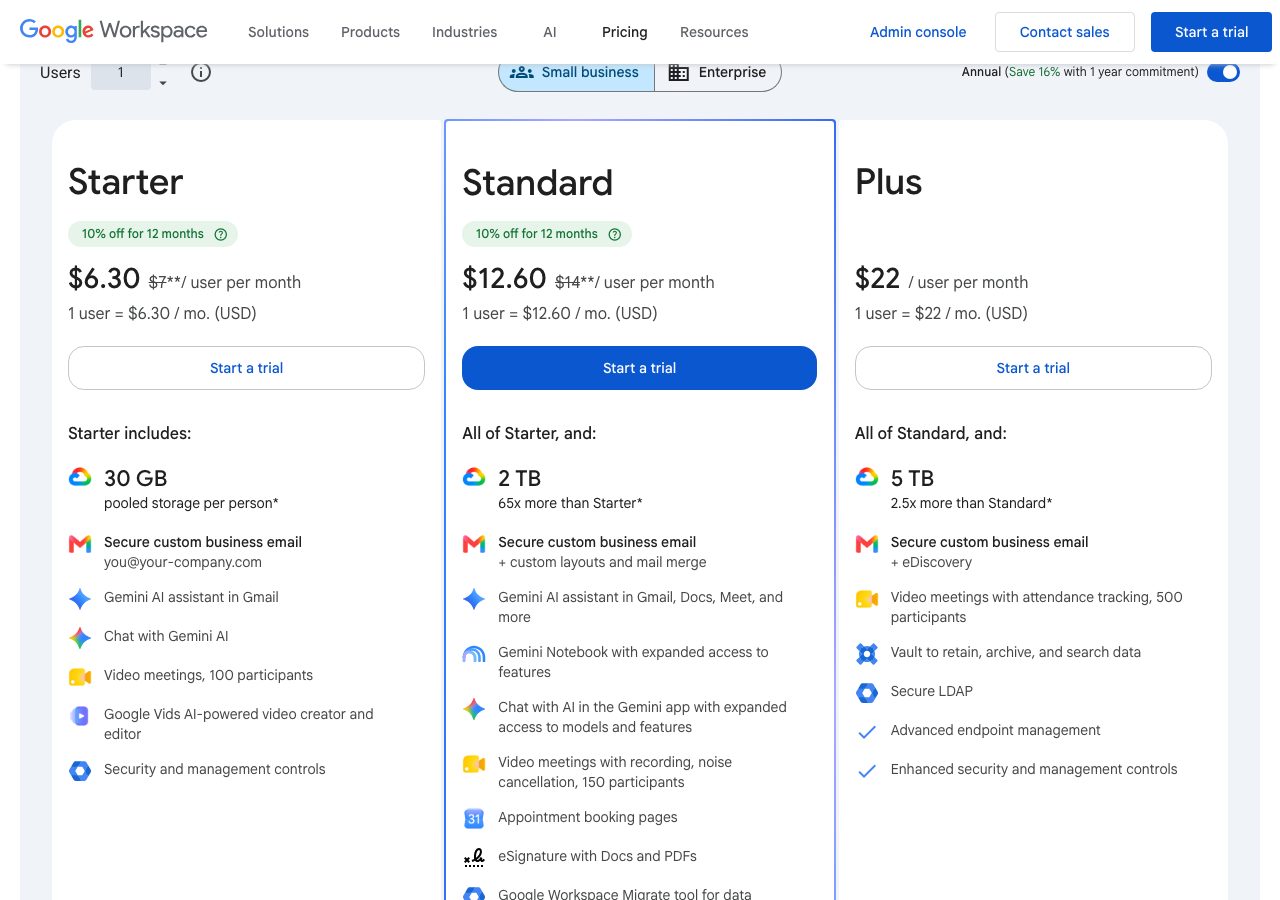
- Per user per month in US dollars, on either an Annual Plan with a one-year commitment or a Flexible Plan billed monthly. Business Starter costs $7 a user a month on the annual plan, or $8.40 on the Flexible Plan, with 30 GB of pooled storage per user, custom business email, Gemini in Gmail and video meetings for 100. Business Standard costs $14, or $16.80 flexible, with 2 TB per user, mail merge and custom layouts in Gmail, meeting recording and appointment pages. Business Plus costs $22, or $26.40 flexible, with 5 TB, eDiscovery, Vault and advanced endpoint management. Enterprise plans are quoted by sales. New customers get 10% off for the first 12 months on the first 20 users, so the page shows $6.30, $12.60 and $7.56, $15.12 as introductory prices. Business plans are limited to 300 users; Enterprise has no limit. There is a 14-day free trial. On the Flexible Plan you add or remove users at any time, pay only for the accounts you had that month and cancel without penalty; on the Annual Plan you commit to the licences for the year, can add but not reduce them until renewal, and are charged the remaining balance with no refund if you cancel early.
- Minimum order
- One user
- Free trial
- 14 days; trial accounts are limited to 500 messages a day
- Billing
- Flexible Plan billed monthly per user, cancel any time without penalty; Annual Plan committed for the year, renewing automatically, with early cancellation charged the remaining balance and no refunds; prices in US dollars before tax
- Mailbox types
- Google Workspace
- Setup time
- An hour or more per tenant by hand: verify the domain, add the MX, SPF, DKIM and DMARC records, create users, then set app passwords or connect over OAuth
- DNS setup
- You add Google's MX, SPF and DKIM records and your own DMARC record at your DNS host
- IP location
- Google's shared Gmail outbound infrastructure; no dedicated IPs
- Warmup
- Not offered; trial accounts are held to 500 messages a day until the domain has paid at least $100, which can take up to 75 days, and Google's bulk-sender rules apply once a domain sends 5,000 messages a day to Gmail
- Replacements
- Not applicable; a user who exceeds a sending limit cannot send new messages for up to 24 hours, and accounts that send spam can be restricted permanently
- Domains
- Bring your own; one primary domain plus domain aliases and secondary domains
- Integrations
- SMTP through smtp.gmail.com on port 25, 465 or 587 with SSL or TLS and an app password, SMTP relay through smtp-relay.gmail.com, up to 10,000 recipients a day per user, OAuth for Gmail, IMAP and SMTP, which sequencers use, Gmail API and Postmaster Tools, Google Sheets, Apps Script and the Workspace Marketplace
Best for: Senders who want Google mailboxes under their own admin control and can set up tenants, DNS and OAuth themselves, ideally on the Flexible Plan.
Not for: Anyone hoping to send bulk volume from a few mailboxes, or teams that want inboxes delivered ready to send.
Google Workspace pricing
Published prices as of Oct 22, 2026 from their pricing page. Prices change; check before you buy.
| Plan | Price | What you get | Extras | Notes |
|---|---|---|---|---|
| Business Starter | $7 a user a month | 30 GB pooled storage, custom email, Gemini in Gmail, Meet for 100 | $8.40 on the Flexible Plan | $6.30 for 12 months for new customers |
| Business Standard | $14 a user a month | 2 TB, mail merge and custom layouts in Gmail, meeting recording | $16.80 on the Flexible Plan | $12.60 for 12 months for new customers |
| Business Plus | $22 a user a month | 5 TB, eDiscovery, Vault, advanced endpoint management | $26.40 on the Flexible Plan | Up to 300 users on Business plans |
| Enterprise | Custom | S/MIME, DLP, data regions, 1,000-person meetings, no user cap | — | Contact sales |
- Business Starter$7 a user a month
30 GB pooled storage, custom email, Gemini in Gmail, Meet for 100
Extras: $8.40 on the Flexible Plan
$6.30 for 12 months for new customers
- Business Standard$14 a user a month
2 TB, mail merge and custom layouts in Gmail, meeting recording
Extras: $16.80 on the Flexible Plan
$12.60 for 12 months for new customers
- Business Plus$22 a user a month
5 TB, eDiscovery, Vault, advanced endpoint management
Extras: $26.40 on the Flexible Plan
Up to 300 users on Business plans
- EnterpriseCustom
S/MIME, DLP, data regions, 1,000-person meetings, no user cap
Contact sales
What Google Workspace does well
- Mail goes out through Google's own infrastructure with authentication and outbound IPs handled by Google.
- Published per-user limits: 2,000 messages and 3,000 unique recipients a day, far above what a cold inbox should send.
- Cheap at the bottom: Business Starter is $7 a user a month on the annual plan, $6.30 for the first year, with a 14-day trial.
- The Flexible Plan lets you add and drop mailboxes monthly and cancel without penalty, which suits rotating fleets.
- OAuth connections to every serious sequencer, an SMTP relay for apps, and Postmaster Tools to watch spam rates.
Where it falls short
- The headline prices need a one-year commitment; the Flexible Plan costs 20% more at $8.40, $16.80 and $26.40.
- Trial accounts are capped at 500 messages a day and 500 external recipients, so a new tenant cannot be pushed.
- Google's sender guidelines require SPF, DKIM, DMARC and a spam rate under 0.3% from any domain sending 5,000 messages a day to Gmail.
- Cancelling an Annual Plan early means paying the remaining balance with no refund, and licences can only be reduced at renewal.
- Doing it yourself means buying, configuring and warming every tenant and domain by hand.
PureMail score for Google Workspace
Five criteria, 1 to 5 each, scored on what Google Workspace publishes. How we score.
3.2 / 5
- Price and value
- 3 / 5
- Setup and control
- 3 / 5
- Deliverability foundations
- 4 / 5
- Terms and support
- 3 / 5
- Fit for cold email
- 3 / 5
Published prices, effective cost per mailbox at 10, 30 and 100, no hidden fees. Unpublished pricing scores 1.
Time to first send, DNS automation, domain options, sequencer connection, ownership of domains and mailboxes.
Mailbox type and its inherited reputation, IP policy, warmup path, replacement policy for blocked mailboxes.
Minimum order, billing flexibility, refund and cancellation terms, support channel and hours.
Built and permitted for outbound, integrations with sequencers, warmup and verification tools.
What Google Workspace is
Google Workspace is Google’s subscription for business email on your own domain, with Drive, Meet, Docs and Gemini around it, and Gmail is the mail service inside it. For cold email it is the mailbox provider most outreach runs on: a Workspace mailbox sends from Google’s infrastructure and connects to every serious sequencer over OAuth. This page covers what it costs, the SMTP settings, the sending limits and the sender rules that decide how hard a tenant can be pushed.
Google Workspace pricing for email
Every price is per user per month in US dollars, on an Annual Plan with a one-year commitment or a Flexible Plan billed monthly. Business Starter costs $7 annual or $8.40 flexible with 30 GB of pooled storage and custom email; Business Standard $14 or $16.80 with 2 TB, mail merge and meeting recording; Business Plus $22 or $26.40 with 5 TB, Vault and eDiscovery; Enterprise is quoted and has no user cap, while Business plans stop at 300 users. New customers pay 10% less for the first 12 months on up to 20 users, which is why the page leads with $6.30 and $12.60. For sending mailboxes nothing above Starter is needed. The trial is 14 days. On the Flexible Plan you add and remove users monthly and cancel without penalty; on the Annual Plan you commit for the year, can only reduce licences at renewal, and pay the remaining balance with no refund if you cancel early.
Google Workspace SMTP settings
These are the settings for sending from an app or device through a Workspace mailbox:
- Server: smtp.gmail.com
- Port: 465 with SSL, or 587 with TLS; port 25 also works
- Sign-in: the full address of the mailbox you send from
- Password: an app password if 2-Step Verification is on
- Limit: 2,000 messages a day through this route
Google’s recommended route for apps is the SMTP relay service at smtp-relay.gmail.com on port 25, 465 or 587, configured in the Admin console with IP or account authentication and allowing up to 10,000 recipients a day per user. Sequencers normally connect over OAuth instead, which avoids app passwords and is what Google recommends.
Gmail sending limits in 2026
Each user can send 2,000 messages a day, 1,500 through mail merge, and only 500 on a trial account. Converting the trial does not lift that cap at once: Google raises it only after the domain has cumulatively paid at least $100, plus the domain price if bought from Google, and says the increase can take up to 75 days after that. A day’s sending may reach 10,000 total recipients and 3,000 unique recipients, of which 2,000 may be outside your domains, or 500 on a trial. One message may carry 2,000 recipients with at most 500 external. A user who exceeds a limit cannot send new messages for up to 24 hours, and accounts that send spam can be restricted permanently. The limits are per user, so a tenant’s capacity grows with its mailboxes, but a cold mailbox should never approach them: a few dozen emails a day is the ceiling that keeps a domain healthy.
Gmail sender guidelines
Since February 2024 every sender to Gmail needs SPF or DKIM on the sending domain, valid forward and reverse DNS, TLS in transit, RFC 5322 formatting, no impersonation of Gmail From headers, and a spam rate below 0.3% in Postmaster Tools, with Google advising under 0.10%. Any domain that sends 5,000 or more messages a day to Gmail must also set up both SPF and DKIM, publish a DMARC record, even at p=none, align the From domain with SPF or DKIM, and support one-click unsubscribe on marketing mail. Cold email that stays under those volumes per domain still benefits from meeting every rule.
Cold email on Google Workspace: what works
Use your own domains with MX, SPF, DKIM and DMARC records at a DNS host such as Cloudflare before the first send. Connect mailboxes to your sequencer, Instantly or Smartlead for example, over OAuth. Keep the Flexible Plan for a rotating fleet so retired mailboxes stop costing money. Warm new mailboxes for weeks, keep each to a few dozen emails a day, and watch Postmaster Tools. Microsoft 365 is the other mailbox platform, with tenant-wide caps instead of per-user ones, and Zoho Mail is the cheap option for a primary domain rather than outreach.
Buying Google Workspace inboxes ready to send
Doing all of this yourself costs $7 to $8.40 a user a month plus the hours to set up each tenant, its domains and its DNS. PureMail’s Google Workspace and Microsoft 365 inboxes cost $3.30 each for 10, $3.10 for 30 to 100 and $2.90 for 101 or more, on domains you bring, with SPF, DKIM, DMARC and MX configured and the inboxes connected to your sending tool in about four hours. The comparison below sets the two side by side: PureMail wins on price per inbox and the setup you skip, and buying direct from Google wins on admin control.
PureMail vs Google Workspace
We sell inboxes too, so read this as one vendor's table built from published prices on both sides, not a neutral verdict.
| PureMail | Google Workspace | |
|---|---|---|
| Price per mailbox | $2.90 (101+ inboxes), $3.10 (30–100), $3.30 (10) | From $7 per user per month for Business Starter on an annual commitment, or $8.40 on the monthly Flexible Plan; new customers pay 10% less for the first 12 months on up to 20 users |
| Mailbox types | Google Workspace and Microsoft 365 | Google Workspace |
| Minimum order | 10 inboxes | One user |
| Setup time | About 4 hours | An hour or more per tenant by hand: verify the domain, add the MX, SPF, DKIM and DMARC records, create users, then set app passwords or connect over OAuth |
| DNS setup | SPF, DKIM, DMARC and MX configured for you | You add Google's MX, SPF and DKIM records and your own DMARC record at your DNS host |
| IP location | US IPs | Google's shared Gmail outbound infrastructure; no dedicated IPs |
| Warmup | Not bundled; warm up in your sending tool | Not offered; trial accounts are held to 500 messages a day until the domain has paid at least $100, which can take up to 75 days, and Google's bulk-sender rules apply once a domain sends 5,000 messages a day to Gmail |
| Domains | Bring your own from any registrar (GoDaddy, Namecheap, Cloudflare, Porkbun) | Bring your own; one primary domain plus domain aliases and secondary domains |
Price per mailbox
PureMail: $2.90 (101+ inboxes), $3.10 (30–100), $3.30 (10)
Google Workspace: From $7 per user per month for Business Starter on an annual commitment, or $8.40 on the monthly Flexible Plan; new customers pay 10% less for the first 12 months on up to 20 users
Mailbox types
PureMail: Google Workspace and Microsoft 365
Google Workspace: Google Workspace
Minimum order
PureMail: 10 inboxes
Google Workspace: One user
Setup time
PureMail: About 4 hours
Google Workspace: An hour or more per tenant by hand: verify the domain, add the MX, SPF, DKIM and DMARC records, create users, then set app passwords or connect over OAuth
DNS setup
PureMail: SPF, DKIM, DMARC and MX configured for you
Google Workspace: You add Google's MX, SPF and DKIM records and your own DMARC record at your DNS host
IP location
PureMail: US IPs
Google Workspace: Google's shared Gmail outbound infrastructure; no dedicated IPs
Warmup
PureMail: Not bundled; warm up in your sending tool
Google Workspace: Not offered; trial accounts are held to 500 messages a day until the domain has paid at least $100, which can take up to 75 days, and Google's bulk-sender rules apply once a domain sends 5,000 messages a day to Gmail
Domains
PureMail: Bring your own from any registrar (GoDaddy, Namecheap, Cloudflare, Porkbun)
Google Workspace: Bring your own; one primary domain plus domain aliases and secondary domains
See PureMail's Google Workspace and Microsoft 365 inboxes for cold email and the full pricing.
Google Workspace alternatives we have reviewed
Microsoft 365
Microsoft business email from $4 a user a month billed yearly: 10,000 recipients a day per mailbox, tenant-wide caps and SMTP AUTH changes in December 2026.
Zoho Mail
Business email from $1 a user a month billed yearly, with reputation-based limits of 50 to 500 external emails an hour and a stated design for one-to-one mail.
Cloudflare
At-cost registrar with free DNS: .com at $10.46 to register and renew, free WHOIS redaction, DNSSEC and DMARC reports; no refunds, Cloudflare nameservers only.
GoDaddy
Registrar and email reseller: Professional Email from $1.99 a mailbox ($4.99 after year one), Microsoft 365 from $7.99 ($14.99 after), .com renews at $22.99.
Google Workspace FAQ
What are the Google Workspace SMTP settings?
Use server smtp.gmail.com on port 465 with SSL or port 587 with TLS, signing in with the full address of the mailbox you send from and an app password if 2-Step Verification is on. Google's recommended route for apps is its SMTP relay at smtp-relay.gmail.com on port 25, 465 or 587, configured in the Admin console and limited to 10,000 recipients a day per user.
How many emails can a Google Workspace user send per day?
Google's published limits are 2,000 messages a day per user, 1,500 for mail merge and 500 for trial accounts, with up to 10,000 total recipients and 3,000 unique recipients a day, of which 2,000 may be external, or 500 external on a trial. A single message can carry 2,000 recipients with at most 500 external. Exceeding a limit stops new sending for up to 24 hours.
What are Gmail's bulk sender requirements?
Since February 2024 every sender to Gmail needs SPF or DKIM, valid forward and reverse DNS, TLS and a spam rate below 0.3% in Postmaster Tools, ideally under 0.10%. Domains sending 5,000 or more messages a day to Gmail must also set up both SPF and DKIM, publish a DMARC record, align the From domain and support one-click unsubscribe on marketing messages.
How much does Google Workspace cost for email?
As of 22 October 2026, Business Starter costs $7 a user a month on an annual commitment or $8.40 on the monthly Flexible Plan, Business Standard $14 or $16.80, and Business Plus $22 or $26.40, with Enterprise quoted. New customers pay 10% less for the first 12 months on up to 20 users. Business plans cap at 300 users and come with a 14-day trial.
Can I use Google Workspace for cold email?
For low-volume, personal outreach from a set of mailboxes, yes; most cold email inbox providers sell Google Workspace accounts for exactly that. Keep each mailbox to a few dozen emails a day, spread volume across mailboxes and domains, authenticate every domain and watch Postmaster Tools. A trial tenant is held to 500 messages a day until the domain has paid $100, which can take up to 75 days.
Can I cancel Google Workspace at any time?
On the Flexible Plan, yes: you are billed monthly for the users you have, can add or remove them at any time and can cancel without penalty. On the Annual Plan you commit for the year, can add licences but only reduce them at renewal, and if you cancel early you are charged the remaining balance of the contract with no refund.
Sources
Disclosure: PureMail sells Google Workspace and Microsoft 365 inboxes and competes with some tools in this directory. We do not assign star ratings and we do not take payment for placement. Spotted an error? Email [email protected] and we will correct it within a week.
More tools in the directory
AgentMail
Email inbox API for AI agents: 3 inboxes free, 10 for $20 a month, 150 for $200, add-ons at $2 an inbox or domain and $2 per 1,000 emails, 20% off yearly.
Cloudflare
At-cost registrar with free DNS: .com at $10.46 to register and renew, free WHOIS redaction, DNSSEC and DMARC reports; no refunds, Cloudflare nameservers only.
GoDaddy
Registrar and email reseller: Professional Email from $1.99 a mailbox ($4.99 after year one), Microsoft 365 from $7.99 ($14.99 after), .com renews at $22.99.
Setup guides from PureMail
How to Set Up SPF, DKIM and DMARC for Cold Email Domains
Step-by-step SPF, DKIM and DMARC setup for cold email domains on Google Workspace and Microsoft 365, plus the mistakes that quietly kill deliverability.