Dripify review (2026): pricing, limits, pros and cons
Dripify automates LinkedIn and email outreach at $59 a user a month, or $39 billed annually, with a 7-day free trial. Verified prices, pros and cons.
Dripify at a glance
Facts checked Oct 6, 2026 on dripify.com
- Price
- From $39 per user per month billed annually for Basic, or $59 monthly; one LinkedIn account per seat
- Pricing model
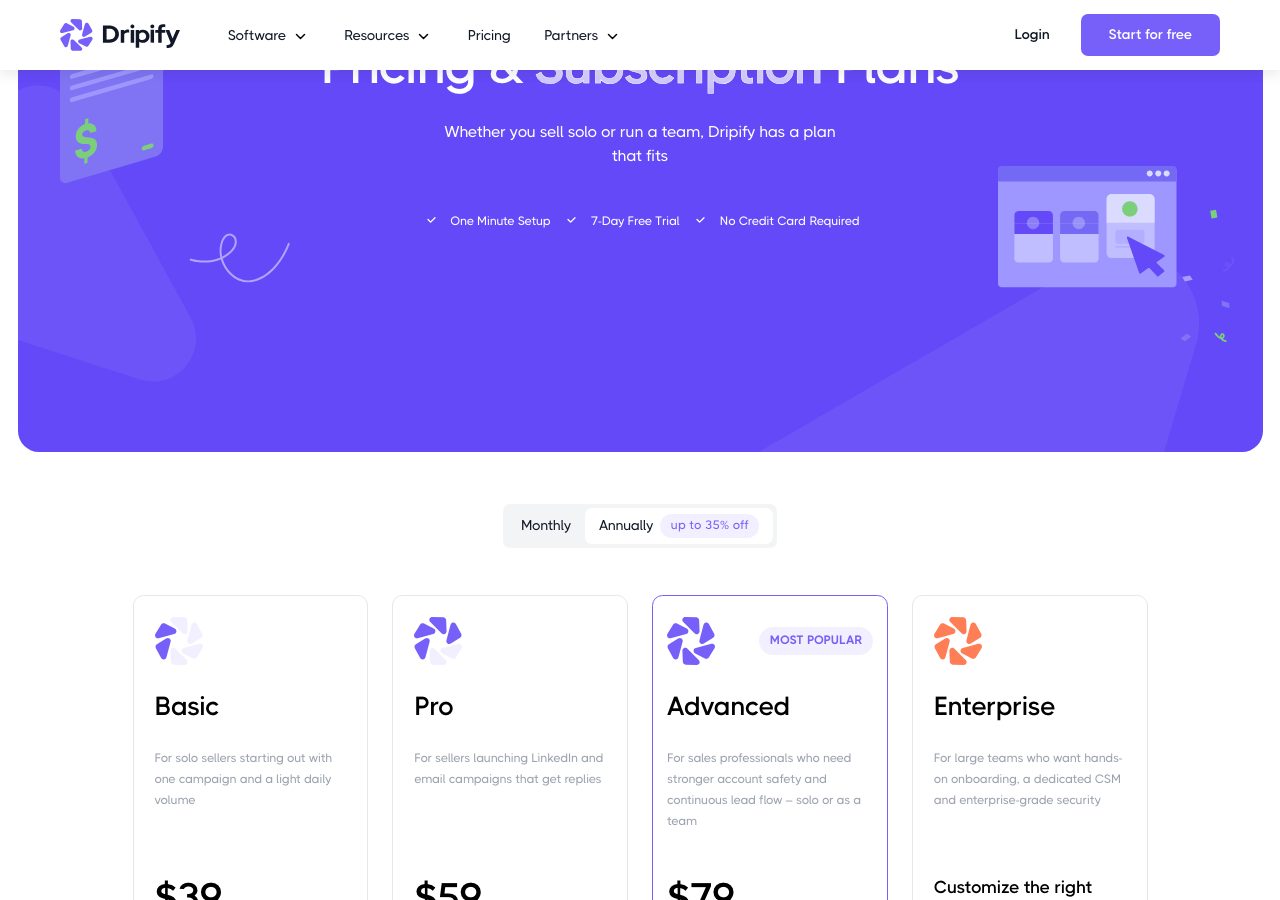
- Per seat, where each seat connects one LinkedIn account. Basic: $59 a month or $39 billed annually, one campaign and reduced daily quotas. Pro: $79 or $59, with unlimited campaigns, full quotas, a dedicated inbox, CSV export, webhooks, HubSpot and an API with an MCP server. Advanced: $99 or $79, adding multi-team management, stronger account protection, lead tagging, step analytics, A/B testing and evergreen campaigns. Enterprise is custom, with onboarding and a success manager. Every plan includes 100 email finder credits a month; extra packs cost $29 for 1,000, $49 for 2,000, $69 for 5,000 and $99 for 10,000.
- Minimum order
- One seat
- Free trial
- 7 days, no card
- Billing
- Monthly or annual, auto-renewing; monthly fees are non-refundable, annual plans refundable within 24 hours of payment; cancel anytime from the billing page, effective at the end of the paid term
- Setup time
- Minutes: connect a LinkedIn account, and an email inbox for email steps
- DNS setup
- Not applicable
- IP location
- Cloud-based, with a unique local IP address for each connected account
- Warmup
- Not applicable
- Replacements
- Not applicable
- Domains
- Not applicable
- Integrations
- Your email inbox, HubSpot, Zapier, Make, Google Sheets, Webhooks, API, MCP server
Best for: Solo sellers, founders and small teams running LinkedIn-first sequences with an email step on a budget.
Not for: Agencies running dozens of LinkedIn accounts, or anyone unwilling to accept the account risk that LinkedIn automation carries.

Dripify pricing
Published prices as of Oct 6, 2026 from their pricing page. Prices change; check before you buy.
| Plan | Price | What you get | Notes |
|---|---|---|---|
| Basic | $59 a user a month | 1 campaign, 20 connection requests and 30 messages a day, LinkedIn and email steps | $39 billed annually |
| Pro | $79 a user a month | Unlimited campaigns, 75 requests and 100-plus messages a day, inbox, API, webhooks | $59 billed annually |
| Advanced | $99 a user a month | Teams, stronger protection, A/B testing, evergreen leads | $79 billed annually |
| Enterprise | Custom | Onboarding, dedicated support, success manager | Priced by seat count |
- Basic$59 a user a month
1 campaign, 20 connection requests and 30 messages a day, LinkedIn and email steps
$39 billed annually
- Pro$79 a user a month
Unlimited campaigns, 75 requests and 100-plus messages a day, inbox, API, webhooks
$59 billed annually
- Advanced$99 a user a month
Teams, stronger protection, A/B testing, evergreen leads
$79 billed annually
- EnterpriseCustom
Onboarding, dedicated support, success manager
Priced by seat count
What Dripify does well
- Cheap per seat: $39 a month on annual billing, with a 7-day trial that needs no card and works with free LinkedIn accounts.
- LinkedIn and email in one sequence on every plan, with a built-in email finder and verifier, and sending that is not metered.
- Cloud-based with a unique local IP per account, human behaviour simulation, duplicate protection and activity control, plus 24/7 live support.
- Pro adds the things a working seller needs: unlimited campaigns, full quotas, a dedicated inbox, CSV export, webhooks, HubSpot and an API with an MCP server.
- Advanced adds team management, A/B testing, lead tagging and evergreen campaigns that keep refilling a sequence from saved searches.
Where it falls short
- Basic is too limited for real outreach: one campaign, 20 connection requests and 30 messages a day.
- One LinkedIn account per seat, so an agency running many accounts pays for each; HeyReach's flat per-sender bundles get cheaper at scale.
- Monthly fees are non-refundable, and annual plans can only be refunded within 24 hours of payment.
- Email finder credits are 100 a month, valid for 30 days and not rolled over; packs cost $29 to $99.
- LinkedIn prohibits automation in its terms; Dripify's limits and IP isolation reduce the risk of restrictions but do not remove it.
PureMail score for Dripify
Five criteria, 1 to 5 each, scored on what Dripify publishes. How we score.
3.4 / 5
- Price and value
- 4 / 5
- Setup and control
- 4 / 5
- Deliverability foundations
- 3 / 5
- Terms and support
- 3 / 5
- Fit for cold email
- 3 / 5
Published prices, effective cost per mailbox at 10, 30 and 100, no hidden fees. Unpublished pricing scores 1.
Time to first send, DNS automation, domain options, sequencer connection, ownership of domains and mailboxes.
Mailbox type and its inherited reputation, IP policy, warmup path, replacement policy for blocked mailboxes.
Minimum order, billing flexibility, refund and cancellation terms, support channel and hours.
Built and permitted for outbound, integrations with sequencers, warmup and verification tools.
What Dripify is
Dripify is a cloud-based LinkedIn automation tool that runs multi-step sequences of connection requests, messages, InMails, profile views and endorsements, and since its email automation arrived, email steps in the same sequence. Each seat connects one LinkedIn account, the account runs from a unique local IP address with human-like timing, and replies land in a dedicated inbox inside the app. It is aimed at solo sellers, founders, recruiters and small sales teams, with team management on the higher plans.
For a cold email operation it is the LinkedIn channel with an email step attached, not a replacement for a sequencer. The email finder and verifier fill in addresses, and the email steps send from an inbox you connect.
Dripify pricing
Three self-serve plans priced per seat, plus Enterprise. Basic is $59 a month, or $39 billed annually, and allows one campaign at reduced daily quotas: 20 connection requests, 30 messages, 10 InMails and 100 profile views a day. Pro is $79 or $59 and lifts the limits to 75 requests, 100 or more messages, 30 InMails and 200 or more views, with unlimited campaigns, a dedicated inbox, CSV export, webhooks, HubSpot and an API with an MCP server. Advanced is $99 or $79 and adds multi-team management, stronger account protection with adaptive activity control, lead tagging, step analytics, A/B testing and evergreen campaigns that keep adding leads from a saved search. Enterprise is priced by seat count and adds premium onboarding, dedicated technical support and a customer success manager.
Every paid plan includes 100 email finder credits a month, charged only when an address is found and verified, valid for 30 days and not rolled over; extra packs cost $29 for 1,000, $49 for 2,000, $69 for 5,000 and $99 for 10,000. Sending itself is not metered. The free trial is 7 days with no card. The terms say monthly fees are non-refundable, annual plans can be refunded within 24 hours of payment, subscriptions renew automatically, and cancellation from the billing page takes effect at the end of the paid term.
How it works
Connect a LinkedIn account, free or paid, and Dripify assigns it a unique local IP and runs the sequence from the cloud, so nothing needs to stay open on your computer. Leads come from LinkedIn searches, Sales Navigator, Recruiter, CSV imports or your existing connections, and the sequence can branch on conditions such as whether a request was accepted. The email step uses the built-in finder to look up a business address, verifies it, and sends from the inbox you connect. Duplicate protection keeps teammates from contacting the same person, and the Advanced plan’s activity control raises volume gradually as an account proves safe.
Who Dripify is for, and who should look elsewhere
Dripify suits solo sellers, founders and small teams running LinkedIn-first sequences with an email step on a budget, and it works with free LinkedIn accounts. It is a poor fit for agencies running dozens of LinkedIn accounts, where per-seat pricing adds up and HeyReach sells flat per-sender bundles with client workspaces, and for anyone unwilling to accept the account risk that comes with any LinkedIn automation: LinkedIn prohibits it in its terms, and limits and IP isolation reduce the risk without removing it. The LinkedIn automation category lists every tool we have reviewed with its score.
Using Dripify with PureMail
Dripify’s email steps send from an inbox you connect, so a warmed Google Workspace or Microsoft 365 inbox from PureMail can carry the email half of a sequence while the LinkedIn half runs from the connected account. Keep that inbox’s daily volume conservative, warm it before it enters a sequence, and verify any address the finder returns before it goes out.
Dripify alternatives we have reviewed
HeyReach
Cloud LinkedIn automation priced per sender: $79 a month or $63 billed yearly, Agency $999 for 25 senders, Unlimited $2,999 capped at 300, 14-day free trial.
Dripify FAQ
How much does Dripify cost?
As of 6 October 2026, Basic is $59 per user a month or $39 billed annually, Pro is $79 or $59, and Advanced is $99 or $79. Enterprise is priced by seat count and adds premium onboarding, dedicated technical support and a customer success manager. Every paid plan includes LinkedIn and email sequences and 100 email finder credits a month, and there is a 7-day free trial with no card.
What counts as a user on Dripify?
A seat connects one LinkedIn account, so a team of five reps needs five seats. Advanced adds multi-team management so one administrator can run several teams from a single login, and teams with 10 or more seats can ask sales to consolidate subscriptions into one account with a single invoice.
What are Dripify's daily limits?
Basic allows up to 20 connection requests, 30 messages, 10 InMails and 100 profile views a day. Pro and Advanced allow 75 connection requests, 100 or more messages, 30 InMails and 200 or more profile views. Advanced adds adaptive activity control that scales volume as the account's safety allows.
Can I get a refund from Dripify?
Monthly purchases are non-refundable. Annual plans are refundable within 24 hours of payment. You can cancel at any time from the billing page or by email, and the cancellation takes effect at the end of the paid term. The 7-day free trial needs no card, so test before you pay.
Can I use Dripify with PureMail inboxes?
Yes. Dripify's email steps send from an inbox you connect, so a warmed Google Workspace or Microsoft 365 inbox from PureMail can carry the email half of a sequence while the LinkedIn half runs from the connected account. Keep the inbox's daily volume conservative and warm it before it enters a sequence.
Sources
Disclosure: PureMail sells Google Workspace and Microsoft 365 inboxes and competes with some tools in this directory. We do not assign star ratings and we do not take payment for placement. Spotted an error? Email [email protected] and we will correct it within a week.
More tools in the directory
HeyReach
Cloud LinkedIn automation priced per sender: $79 a month or $63 billed yearly, Agency $999 for 25 senders, Unlimited $2,999 capped at 300, 14-day free trial.
PhantomBuster
Cloud automations for LinkedIn and 15 other platforms, priced by execution hours and slots: free trial, then $69, $159 or $439 a month, 20% less yearly.
Waalaxy
LinkedIn outreach automation at €19, €49 or €69 a user a month billed yearly, or €39, €99 and €139 monthly, with 300 or 800 invitations a month.
Setup guides from PureMail
How to Set Up SPF, DKIM and DMARC for Cold Email Domains
Step-by-step SPF, DKIM and DMARC setup for cold email domains on Google Workspace and Microsoft 365, plus the mistakes that quietly kill deliverability.