LinkedIn Sales Navigator review (2026): pricing, plans, verdict
Sales Navigator pricing verified: Core $119.99 a month or $1,079.88 a year, Advanced $159.99 or $1,799.88, Advanced Plus by demo; trial, 7-day refunds.
LinkedIn Sales Navigator at a glance
Facts checked Oct 13, 2026 on business.linkedin.com
- Price
- From $119.99 per licence a month for Core billed monthly, or $1,079.88 a year (about $89.99 a month); Advanced $159.99 or $1,799.88 a year; Advanced Plus quoted
- Pricing model
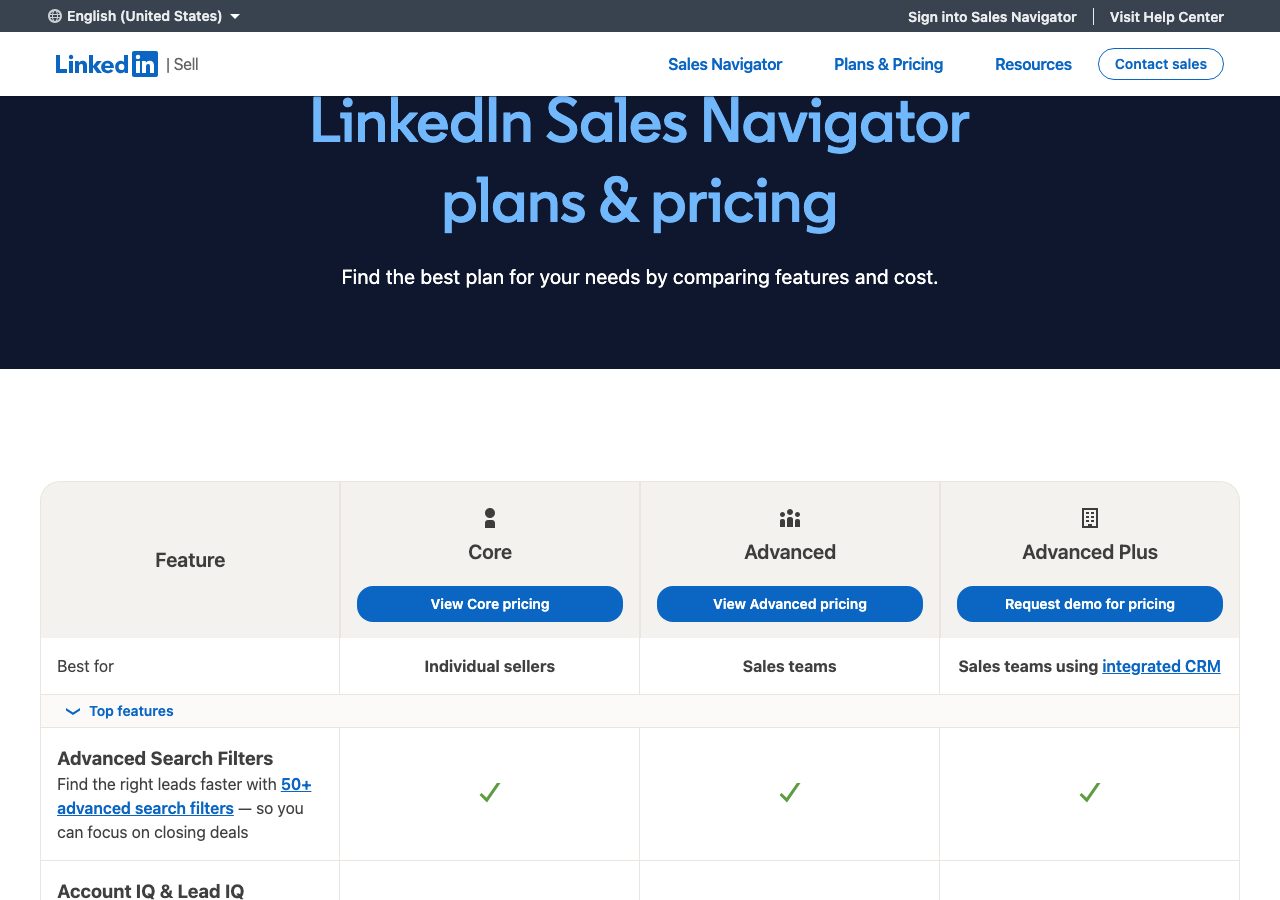
- Per licence, monthly or annual, in three plans. LinkedIn's own pricing FAQ, updated 27 September 2026, puts Core at US$119.99 a month per licence or US$1,079.88 a year, a 25% saving, and Advanced at US$159.99 a month or US$1,799.88 a year, a 6% saving, with localised prices in Australian and Canadian dollars, euros and pounds (Core is £94.99 a month or £959.88 a year, Advanced £130 or £1,499.88). Advanced Plus is quoted after a demo based on team size, CRM integration and onboarding needs. The prices are described as estimates that may exclude VAT or GST and promotional discounts and can vary slightly by device. All three plans include 50-plus advanced search filters and 50 InMails a month; LinkedIn positions Core for individual sellers, Advanced for sales teams wanting AI-powered account and lead research, buyer insights and collaboration tools, and Advanced Plus for teams on Salesforce, HubSpot, Microsoft Dynamics, Oracle and other CRMs that want real-time sync and lead creation from the tool. Free trials of Core and Advanced need a payment card and are open to members not on any paid LinkedIn subscription who have not used a LinkedIn trial in the past 365 days.
- Minimum order
- One licence
- Free trial
- Core or Advanced, card required, for members with no paid LinkedIn subscription and no LinkedIn trial in the past 365 days; reminder email seven days before it ends
- Billing
- Monthly or annual per licence; cancellation takes effect at the end of the paid month or year; LinkedIn's refund policy allows a refund within seven days of the charge if Premium features were not used, with EU citizens entitled to a full refund within 14 days; iOS purchases are refunded through Apple
- Setup time
- Minutes: start a trial from a LinkedIn account; Advanced Plus is set up with a LinkedIn representative
- DNS setup
- Not applicable
- IP location
- Not applicable
- Warmup
- Not applicable
- Replacements
- Not applicable
- Domains
- Not applicable
- Integrations
- Salesforce, HubSpot, Microsoft Dynamics and Oracle CRM sync (Advanced Plus), CRM embedded experiences and 15-plus sales integration tools, Sales Navigator for Microsoft Teams alerts, CSV upload and CRM import of your book of business, Smart Links for trackable content sharing
Best for: Sellers and teams who build B2B target lists from LinkedIn and want search, alerts and InMail on one licence.
Not for: Anyone expecting email addresses or sending from the tool; cold email needs a finder, a verifier and a sequencer on top.
LinkedIn Sales Navigator pricing
Published prices as of Oct 13, 2026 from their pricing page. Prices change; check before you buy.
| Plan | Price | What you get | Notes |
|---|---|---|---|
| Core | $119.99 a month | 50-plus search filters, 50 InMails a month, individual seller tools | $1,079.88 a year, a 25% saving |
| Advanced | $159.99 a month | Core plus AI account research, buyer insights, team tools | $1,799.88 a year, a 6% saving |
| Advanced Plus | Quoted | Advanced plus CRM sync, lead creation, dedicated account team | Priced by team size and CRM needs |
- Core$119.99 a month
50-plus search filters, 50 InMails a month, individual seller tools
$1,079.88 a year, a 25% saving
- Advanced$159.99 a month
Core plus AI account research, buyer insights, team tools
$1,799.88 a year, a 6% saving
- Advanced PlusQuoted
Advanced plus CRM sync, lead creation, dedicated account team
Priced by team size and CRM needs
What LinkedIn Sales Navigator does well
- Published prices in LinkedIn's own FAQ, dated 27 September 2026, in five currencies with the annual saving stated.
- The deepest B2B people and company search available, with 50-plus filters and 50 InMails a month on every plan.
- Advanced adds AI research, buyer intent, TeamLink introductions, Smart Links and team reporting for groups.
- A free trial of Core or Advanced with a reminder email seven days before it ends, and cancellation at the end of the period.
- A written refund policy with a seven-day window and stronger rights for EU residents.
Where it falls short
- It gives you people, not email addresses; exporting and enriching a list means another tool and more cost.
- Per-licence pricing from $119.99 a month adds up fast for a team, and Advanced saves only 6% on annual billing.
- Trial eligibility excludes anyone on a paid LinkedIn plan or who has trialled anything from LinkedIn in the past 365 days.
- Refunds need the request within seven days and no use of Premium features; after that you pay to the end of the period.
- The compare page itself shows no prices; they sit in the FAQ below and in the checkout.
PureMail score for LinkedIn Sales Navigator
Five criteria, 1 to 5 each, scored on what LinkedIn Sales Navigator publishes. How we score.
3.4 / 5
- Price and value
- 3 / 5
- Setup and control
- 4 / 5
- Deliverability foundations
- 3 / 5
- Terms and support
- 3 / 5
- Fit for cold email
- 4 / 5
Published prices, effective cost per mailbox at 10, 30 and 100, no hidden fees. Unpublished pricing scores 1.
Time to first send, DNS automation, domain options, sequencer connection, ownership of domains and mailboxes.
Mailbox type and its inherited reputation, IP policy, warmup path, replacement policy for blocked mailboxes.
Minimum order, billing flexibility, refund and cancellation terms, support channel and hours.
Built and permitted for outbound, integrations with sequencers, warmup and verification tools.
What LinkedIn Sales Navigator is
LinkedIn Sales Navigator is LinkedIn’s paid prospecting product: advanced people and company search over the LinkedIn graph, lead and account lists, alerts on job changes and posts, InMail credits, AI-written outreach suggestions and, on the higher plans, team collaboration, buyer intent signals and CRM sync. It is sold per licence in Core, Advanced and Advanced Plus editions. For cold email it is the list source at the top of the funnel; it holds no email addresses and sends nothing.
Sales Navigator pricing explained
Per licence, monthly or annual. LinkedIn’s pricing FAQ, updated 27 September 2026, lists Core at US$119.99 a month or US$1,079.88 a year, a 25% saving, and Advanced at US$159.99 a month or US$1,799.88 a year, a 6% saving, with equivalents in Australian and Canadian dollars, euros and pounds; in the UK Core is £94.99 or £959.88 and Advanced £130 or £1,499.88. Advanced Plus is quoted after a demo by team size, CRM integration and onboarding. LinkedIn calls the figures estimates that may exclude VAT and promotions and can differ by device. Trials of Core and Advanced need a card and are open only to members without a paid LinkedIn subscription who have not used a LinkedIn trial in the past year, with a reminder email seven days before the end. Cancellation takes effect at the end of the paid month or year; the refund policy allows a refund within seven days of a charge if Premium features went unused, and EU citizens can claim a full refund within 14 days.
Search, InMail and team features
Every plan carries the 50-plus advanced search filters and 50 InMails a month, the most of any LinkedIn product by LinkedIn’s account, plus Relationship Explorer, alerts and Message Assist. LinkedIn positions Advanced for teams: Account IQ and Lead IQ research summaries, buyer intent signals, TeamLink warm introductions, Smart Links for tracked content, Relationship Maps of buying committees and team reporting. Advanced Plus adds real-time sync and lead creation into Salesforce, HubSpot, Microsoft Dynamics, Oracle and others, CRM-embedded profiles, a dedicated account team when bought through a representative, and alerts inside Microsoft Teams.
What that means for cold email
Sales Navigator is where most B2B cold email lists start, and its filters are the reason. The gap is everything after the search: you still need an exporter or enrichment tool to turn saved leads into addresses, a verifier to clean them, and a sequencer with its own inboxes to send. Budget for the whole chain, and treat the licence as the cost of good targeting rather than a sending tool.
Who Sales Navigator is for, and who should look elsewhere
Sales Navigator suits sellers and teams who build B2B target lists from LinkedIn and want search, alerts and InMail on one licence. It is a poor fit for anyone expecting email addresses or sending from the tool. Evaboot exports and cleans Sales Navigator searches, Apollo bundles a database with a sequencer, ContactOut adds personal emails and phones, and HeyReach automates the LinkedIn side. The lead data category compares them. Cognism supplies verified emails and mobiles with intent signals, quoted by sales with five seats included.
Using Sales Navigator with PureMail
Search and save in Sales Navigator, export and enrich with a finder, verify the addresses, then send from a sequencer connected to PureMail’s Google Workspace or Microsoft 365 inboxes on separate outreach domains. LinkedIn stays the research layer, PureMail carries the sending reputation, and your primary domain stays out of both.
LinkedIn Sales Navigator alternatives we have reviewed
Evaboot
Sales Navigator export with emails included: $29 a month for 400 credits ($0.072), $49 for 1,000 ($0.049), $99 for 3,000 ($0.033), unlimited seats.
Apollo.io
B2B contact database plus a built-in sequencer: free tier, then $49, $79 and $119 a seat a month billed annually, with credits for emails and phones.
ContactOut
Contact finder with a free plan of 5 lookups a day, $49 a month for unlimited emails under a 2,000-credit fair-use cap, and $99 a month with phones.
HeyReach
Cloud LinkedIn automation priced per sender: $79 a month or $63 billed yearly, Agency $999 for 25 senders, Unlimited $2,999 capped at 300, 14-day free trial.
Cognism
B2B contact and mobile data with intent signals, sold by quote: Standard and Pro packages with 5 seats included, one credit per revealed contact.
LinkedIn Sales Navigator FAQ
How much does LinkedIn Sales Navigator cost?
As of 13 October 2026, per LinkedIn's own FAQ updated 27 September 2026, Core costs US$119.99 a month per licence or $1,079.88 a year, a 25% saving, and Advanced $159.99 a month or $1,799.88 a year, a 6% saving. Advanced Plus is quoted after a demo based on team size, CRM integration and onboarding. Prices may exclude VAT and vary by device.
Is there a free trial of Sales Navigator?
Yes, for Core and Advanced, if you are not on any paid LinkedIn subscription and have not used a LinkedIn free trial in the past 365 days. A payment card is required; LinkedIn emails a reminder seven days before the trial ends and you can cancel for any reason before then to avoid the charge. Availability and features vary by plan and region.
Can I get a refund on Sales Navigator?
Within limits. LinkedIn's refund policy says Sales Navigator may be refundable within seven days of the charge if the Premium features were not used, and a previous refund can affect eligibility. Cancellation otherwise takes effect at the end of the paid month or year. EU citizens get a 14-day full refund right, and iOS purchases are refunded by Apple.
What is the difference between Core, Advanced and Advanced Plus?
Core is for individual sellers and carries the 50-plus search filters and 50 InMails a month that every plan includes. LinkedIn describes Advanced as the plan for sales teams needing AI-powered lead and account research, actionable insights and collaboration tools such as TeamLink and team seat management. Advanced Plus adds real-time CRM sync with Salesforce, HubSpot, Dynamics and Oracle.
How does Sales Navigator fit with PureMail?
Sales Navigator finds the people; it does not give you their email addresses or send anything. Export or enrich the saved leads with a finder, verify them, then load the list into a sequencer connected to PureMail's Google Workspace or Microsoft 365 inboxes on separate outreach domains. That keeps LinkedIn, your primary domain and your cold volume cleanly apart.
Sources
Disclosure: PureMail sells Google Workspace and Microsoft 365 inboxes and competes with some tools in this directory. We do not assign star ratings and we do not take payment for placement. Spotted an error? Email [email protected] and we will correct it within a week.
More tools in the directory
Apollo.io
B2B contact database plus a built-in sequencer: free tier, then $49, $79 and $119 a seat a month billed annually, with credits for emails and phones.
Browse AI
No-code web scraper on credits: free plan with 50 a month, Personal $19 a month billed yearly for 12,000 a year or $48 monthly, Professional from $69.
Cognism
B2B contact and mobile data with intent signals, sold by quote: Standard and Pro packages with 5 seats included, one credit per revealed contact.
Setup guides from PureMail
How to Set Up SPF, DKIM and DMARC for Cold Email Domains
Step-by-step SPF, DKIM and DMARC setup for cold email domains on Google Workspace and Microsoft 365, plus the mistakes that quietly kill deliverability.