Browse AI review (2026): pricing, credits, pros and cons
Browse AI scrapes any website without code: free for 50 credits a month, then $19 a month billed yearly or $48 monthly. Verified prices, pros and cons.
Browse AI at a glance
Facts checked Oct 6, 2026 on browse.ai
- Price
- From $19 per month billed yearly for 12,000 credits a year; $48 a month on monthly billing for 2,000 credits a month; free plan with 50 credits a month
- Pricing model
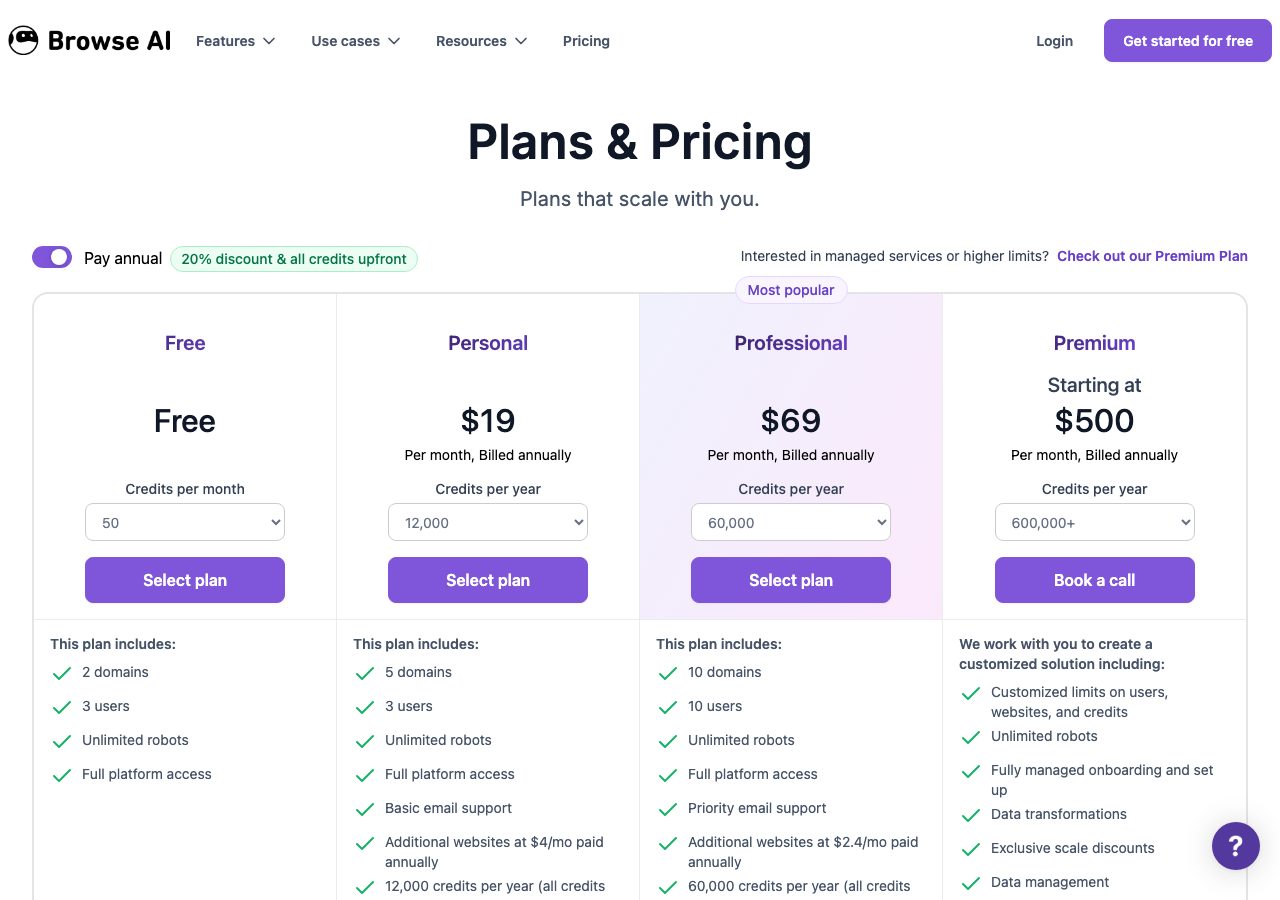
- Credit plans where one credit buys 10 rows from a page or one screenshot, and premium sites cost 2 to 10 credits a task. Free: 50 credits a month, 2 websites, 3 users. Personal: $19 a month billed yearly for 12,000 credits a year, $38 for 24,000, or $48 a month on monthly billing for 2,000 credits a month, with 5 websites and 3 users. Professional: $69 a month billed yearly for 60,000 credits a year, rising to $319 for 360,000, or $87 a month on monthly billing for 5,000 credits a month, with 10 websites and 10 users. Premium managed service from $500 a month billed yearly. Extra websites $2.40 to $5 a month, extra credits from about 1.3 to 2.4 cents each. Unused credits reset each cycle.
- Minimum order
- None; the free plan needs no card
- Free trial
- Free plan with 50 credits a month, plus a 60-day satisfaction guarantee with conditions
- Billing
- Monthly, or yearly with all credits loaded up front; cancel anytime with no proration; refunds within 60 days under the help-centre policy
- Setup time
- Minutes: train a robot by pointing and clicking, or start from one of 250-plus prebuilt robots
- DNS setup
- Not applicable
- IP location
- Not applicable
- Warmup
- Not applicable
- Replacements
- One credit buys 10 rows or one screenshot; premium sites cost 2 to 10 credits a task; unused credits reset each cycle
- Domains
- Not applicable
- Integrations
- Google Sheets, Airtable, Zapier, Make, Pabbly Connect, REST API, Webhooks, Amazon S3
Best for: Teams that need recurring, structured scrapes from directories, marketplaces or job boards delivered to a sheet or an API, and are happy to prepay a year.
Not for: One-off list grabs, which a free extension handles, or anyone expecting email addresses to come out of the scraper.

Browse AI pricing
Published prices as of Oct 6, 2026 from their pricing page. Prices change; check before you buy.
| Plan | Price | What you get | Notes |
|---|---|---|---|
| Free | $0 | 50 credits a month, 2 websites, 3 users | No card needed |
| Personal | $19 a month, billed yearly | 12,000 credits a year, 5 websites, 3 users | $38 for 24,000 a year; $48 monthly for 2,000 a month |
| Professional | $69 a month, billed yearly | 60,000 credits a year, 10 websites, 10 users, priority support | Up to $319 for 360,000 a year; $87 monthly for 5,000 a month |
| Premium | From $500 a month | 600,000-plus credits, managed setup, account manager | Yearly billing only |
- Free$0
50 credits a month, 2 websites, 3 users
No card needed
- Personal$19 a month, billed yearly
12,000 credits a year, 5 websites, 3 users
$38 for 24,000 a year; $48 monthly for 2,000 a month
- Professional$69 a month, billed yearly
60,000 credits a year, 10 websites, 10 users, priority support
Up to $319 for 360,000 a year; $87 monthly for 5,000 a month
- PremiumFrom $500 a month
600,000-plus credits, managed setup, account manager
Yearly billing only
What Browse AI does well
- A free plan with 50 credits a month and no card, enough to scrape a few hundred rows and see whether a site works before paying.
- Point-and-click robots that handle pagination, logins, forms and infinite scroll, plus deep scraping that chains robots across list and detail pages.
- Monitoring: robots re-run on a schedule and alert you when a page changes, which turns a directory or job board into a live lead source.
- Data lands where you work: Google Sheets, Airtable, webhooks and an API, with Zapier and Make for everything else.
- A 60-day satisfaction guarantee with stated conditions, immediate cancellation, and a managed Premium tier if you would rather not build robots.
Where it falls short
- Monthly billing is expensive: $48 for 2,000 credits on Personal and $87 for 5,000 on Professional, against $19 and $69 a month with a year prepaid.
- Credits go fast: one credit is 10 rows or one screenshot, premium sites cost 2 to 10 credits a task, and unused credits reset at the end of each cycle.
- Websites are capped per plan, 2 on Free, 5 on Personal and 10 on Professional, with extra sites at $2.40 to $5 a month each.
- It scrapes what is on the page: it finds no emails and verifies nothing, so lists still need a finder and a verifier.
- Many sites prohibit scraping in their terms and personal data is subject to privacy law; the 770,000 users figure is the company's own.
PureMail score for Browse AI
Five criteria, 1 to 5 each, scored on what Browse AI publishes. How we score.
3.6 / 5
- Price and value
- 3 / 5
- Setup and control
- 5 / 5
- Deliverability foundations
- 3 / 5
- Terms and support
- 4 / 5
- Fit for cold email
- 3 / 5
Published prices, effective cost per mailbox at 10, 30 and 100, no hidden fees. Unpublished pricing scores 1.
Time to first send, DNS automation, domain options, sequencer connection, ownership of domains and mailboxes.
Mailbox type and its inherited reputation, IP policy, warmup path, replacement policy for blocked mailboxes.
Minimum order, billing flexibility, refund and cancellation terms, support channel and hours.
Built and permitted for outbound, integrations with sequencers, warmup and verification tools.
What Browse AI is
Browse AI is a no-code web scraping and monitoring platform. You train a robot by pointing at the data on a page, and it extracts that data into a spreadsheet, re-runs on a schedule, follows pagination and infinite scroll, logs in where you have access, chains with other robots to go from a list page into every detail page, and alerts you when something changes. The company says more than 770,000 people use it, that it is SOC 2 Type II certified and GDPR and CCPA compliant, and that it maintains more than 250 prebuilt robots for popular sites; the user count is its own figure.
For cold email it is a list-building engine rather than a finder. A directory of agencies, a job board, a marketplace category or a conference exhibitor list becomes a live table of companies and names, refreshed automatically, that you then enrich and verify before sending.
Browse AI pricing
Plans are priced in credits, and one credit extracts 10 rows from a page or captures one screenshot; tasks on sites Browse AI classes as premium cost at least 2 to 10 credits. The free plan gives 50 credits a month across 2 websites and 3 users, with no card. Personal is $19 a month billed yearly for 12,000 credits a year, or $38 for 24,000, across 5 websites. Professional is $69 a month billed yearly for 60,000 credits a year, rising through $129 and $239 to $319 for 360,000, across 10 websites and 10 users with priority support. Premium is a managed service from $500 a month, billed yearly, where Browse AI builds and maintains the robots and promises deployment in 10 days.
Monthly billing changes the picture. Personal costs $48 a month for 2,000 credits a month, and Professional $87 for 5,000 a month, so a year paid up front is about a fifth cheaper per credit and far cheaper per month. Extra websites cost $4 to $5 a month on Personal and $2.40 to $3 on Professional, and extra credits run from roughly 2.4 cents each on Personal down to 1.3 cents at the top of Professional. Unused credits reset at the end of each cycle. The terms say cancellation takes effect immediately with no proration, and the help centre’s refund policy promises full refunds for renewals left unused within 60 days, or within 30 days if the software could not be made to work and support could not resolve it.
How it works
Open the page you want, pick the rows and columns, and the robot learns the pattern; it can also be given parameters so one robot searches many terms or locations. Deep scraping chains robots: one collects every listing URL, the next visits each and pulls the details. Monitoring re-runs a robot hourly, daily or weekly and emails or webhooks the difference. Results sync to Google Sheets or Airtable, push through webhooks or the REST API, land in Amazon S3, or flow into Zapier, Make and Pabbly for anything else. The feature table lists residential proxies and bot-evasion retries on every plan, which matters on sites that block scrapers.
Limits and rules
Credits are the constraint. A 1,000-row scrape of a plain site costs 100 credits; the same on a premium site can cost several times more, and a monitoring robot spends credits on every run, so size the plan to the refresh rate you really need. Websites are capped per plan. And the output is names, companies and URLs, not emails: Browse AI does no finding or verification. Finally, many sites prohibit scraping in their terms, LinkedIn among them, and personal data is covered by privacy law in most countries, so keep to business contact data on sites that permit it and respect rate limits.
Who Browse AI is for, and who should look elsewhere
Browse AI suits teams that need recurring, structured scrapes from directories, marketplaces or job boards delivered to a sheet or an API, and are happy to prepay a year. It is a poor fit for one-off list grabs, where a free extension does the job, and for anyone expecting email addresses to come out of a scraper. Instant Data Scraper is the free one-off alternative, and for turning scraped names into addresses ContactOut and SignalHire are the finders we have reviewed with the lowest per-contact prices. The lead data category lists every tool with its score, and our verification tool reviews cover the step that comes next.
Using Browse AI with PureMail
Browse AI builds the source list; your sending inboxes carry the reputation. Scrape the directory into a sheet, find and verify the emails, then load the clean list into the sequencer that the Google Workspace and Microsoft 365 inboxes PureMail sets up for cold email are connected to, with daily limits set for warm sending. Let a monitoring robot add new rows as the source changes, and treat every new batch as a fresh list that needs verifying before it goes out.
Browse AI alternatives we have reviewed
Instant Data Scraper
Free Chrome and Edge extension that pulls listings from any page into CSV or Excel, with next-page crawling and infinite scroll; no account, no credits.
ContactOut
Contact finder with a free plan of 5 lookups a day, $49 a month for unlimited emails under a 2,000-credit fair-use cap, and $99 a month with phones.
SignalHire
Contact finder with a free 5-credit plan, $69 a month for 1,000 email credits or 435 phone credits, unlimited users, a Chrome extension and an API.
Browse AI FAQ
How much does Browse AI cost?
As of 6 October 2026, the free plan gives 50 credits a month. Personal is $19 a month billed yearly for 12,000 credits a year, or $38 for 24,000; on monthly billing it is $48 a month for 2,000 credits a month. Professional is $69 a month billed yearly for 60,000 credits a year, rising to $319 for 360,000, or $87 a month on monthly billing for 5,000 credits a month. Premium, a managed service, starts at $500 a month billed yearly.
What is a Browse AI credit?
One credit extracts 10 rows of data from a page or captures one screenshot. Tasks on sites Browse AI classes as premium cost at least 2 to 10 credits. Credits reset at the end of each monthly or yearly cycle and unused ones are not carried over, except that upgrading mid-cycle carries the balance into the new plan.
Is Browse AI free?
There is a free plan with 50 credits a month, 2 websites and 3 users, with no card required, which is enough to scrape a few hundred rows and test a site. The paid plans come with a satisfaction guarantee: the help centre says renewals unused in the last 60 days are refunded in full, and a subscription that could not be made to work within 30 days, reported to support, is refunded.
What can Browse AI scrape, and is it allowed?
Any site you can see in a browser: directories, marketplaces, job boards, review sites, search results and pages behind a login you hold. Browse AI also offers more than 250 prebuilt robots for popular sites. Whether you may scrape a given site depends on its terms, LinkedIn for instance prohibits it, and personal data is covered by privacy law in most countries, so keep to business contact data on sites that allow it.
Can I use Browse AI to build cold email lists for PureMail inboxes?
Yes, as the first step. Scrape names, companies and websites into a sheet, run them through an email finder, since Browse AI finds no emails itself, verify the results, and load the clean list into the sequencer your PureMail inboxes are connected to. A monitoring robot can keep adding new rows as the source changes.
Sources
Disclosure: PureMail sells Google Workspace and Microsoft 365 inboxes and competes with some tools in this directory. We do not assign star ratings and we do not take payment for placement. Spotted an error? Email [email protected] and we will correct it within a week.
More tools in the directory
Apollo.io
B2B contact database plus a built-in sequencer: free tier, then $49, $79 and $119 a seat a month billed annually, with credits for emails and phones.
ContactOut
Contact finder with a free plan of 5 lookups a day, $49 a month for unlimited emails under a 2,000-credit fair-use cap, and $99 a month with phones.
Instant Data Scraper
Free Chrome and Edge extension that pulls listings from any page into CSV or Excel, with next-page crawling and infinite scroll; no account, no credits.
Setup guides from PureMail
How to Set Up SPF, DKIM and DMARC for Cold Email Domains
Step-by-step SPF, DKIM and DMARC setup for cold email domains on Google Workspace and Microsoft 365, plus the mistakes that quietly kill deliverability.