Evaboot review (2026): pricing per credit, Sales Navigator export
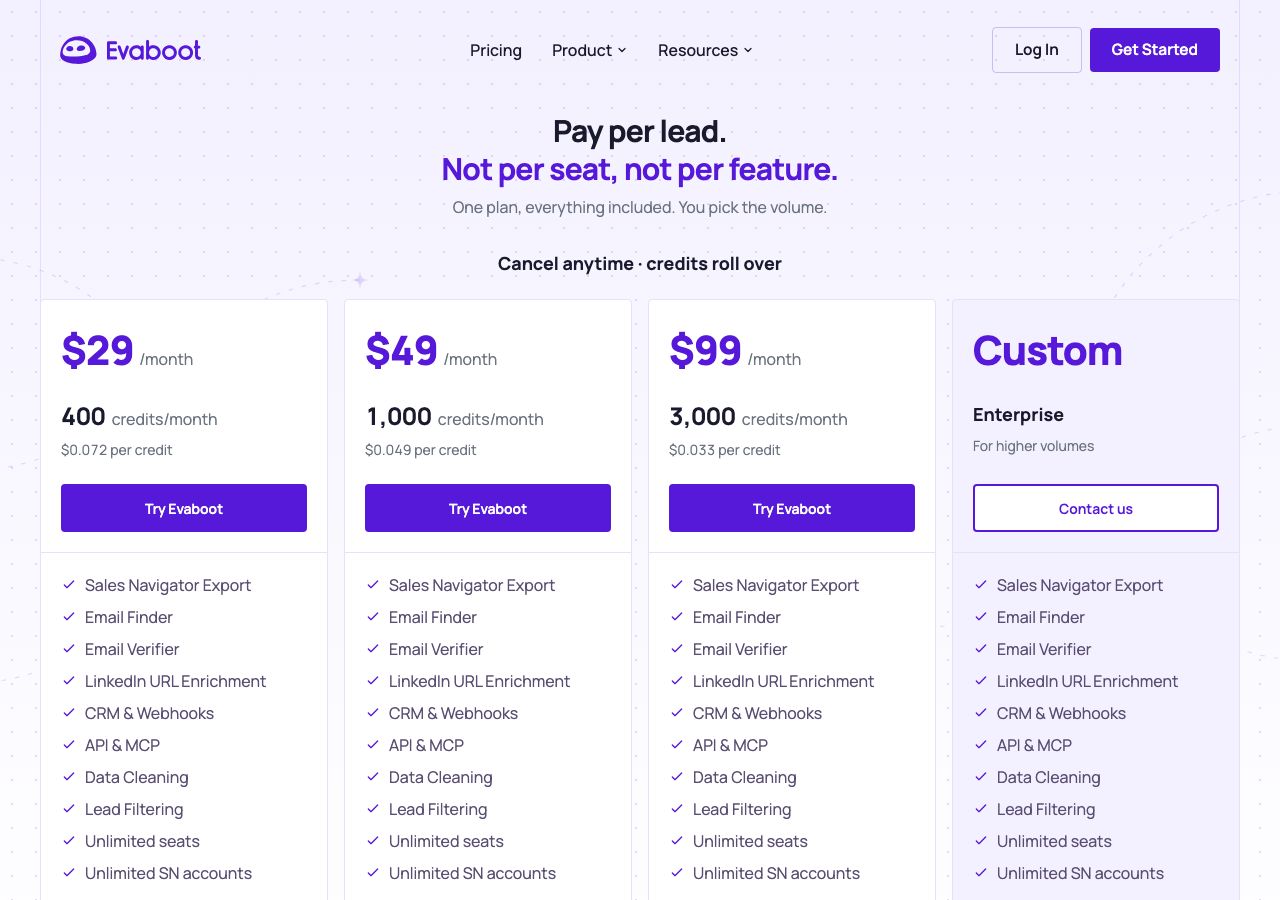
Evaboot pricing verified: $29 a month for 400 credits, $49 for 1,000, $99 for 3,000, one exported lead with email per credit, unlimited seats, rolling credits.
Evaboot at a glance
Facts checked Oct 13, 2026 on evaboot.com
- Price
- From $0.033 per credit on the $99 plan (3,000 credits a month); $0.049 on the $49 plan (1,000); $0.072 on the $29 plan (400); one credit exports one lead with its verified email
- Pricing model
- One plan with every feature, priced by monthly credit volume: $29 a month for 400 credits ($0.072 each), $49 for 1,000 ($0.049), $99 for 3,000 ($0.033) and a custom Enterprise tier for higher volumes. Every tier includes Sales Navigator export, the email finder and verifier, LinkedIn URL enrichment, CRM and webhook integrations, an API and MCP server, data cleaning, lead filtering, unlimited seats and unlimited Sales Navigator accounts. One exported lead costs one credit and includes the email search; a lead with no email found still costs a credit, as does an exported account. In the standalone finder a found email costs one credit and a miss nothing; the verifier costs one credit a check. Unused credits roll over while the subscription is active, you can buy once by subscribing and cancelling, and you can pause billing for one to three months. The FAQ mentions yearly subscriptions, which cannot be cancelled early, but the page shows monthly prices only.
- Minimum order
- $29 for 400 credits
- Free trial
- Not stated on the pricing page; the terms refer to a free trial and included free credits, amount not stated, and the site offers free sign-up
- Billing
- Monthly, auto-renewing, cancel any time and keep the credits until the end of the period; yearly subscriptions cannot be cancelled or downgraded before the end of the contract; no refunds, including for leads without emails; remaining credits are lost when a cancelled plan ends; Estonian law
- Setup time
- Minutes: install the Chrome extension, run a Sales Navigator search, click export, download the cleaned list with emails
- DNS setup
- Not applicable
- IP location
- Not applicable
- Warmup
- Not applicable; Evaboot builds lists rather than sending
- Replacements
- Not applicable
- Domains
- Not applicable
- Integrations
- Chrome extension for Sales Navigator, CRM and webhooks, API and MCP server, Email finder and verifier, LinkedIn URL enrichment, CSV export
Best for: Anyone who prospects in Sales Navigator and wants clean exports with verified emails without paying per seat.
Not for: Teams without Sales Navigator, or those that need phone numbers and firmographic data beyond what LinkedIn shows.

Evaboot pricing
Published prices as of Oct 13, 2026 from their pricing page. Prices change; check before you buy.
| Plan | Price | What you get | Notes |
|---|---|---|---|
| 400 credits | $29 a month | $0.072 a credit, every feature, unlimited seats | Credits roll over |
| 1,000 credits | $49 a month | $0.049 a credit | Credits roll over |
| 3,000 credits | $99 a month | $0.033 a credit | Credits roll over |
| Enterprise | Custom | Higher volumes | Contact sales |
- 400 credits$29 a month
$0.072 a credit, every feature, unlimited seats
Credits roll over
- 1,000 credits$49 a month
$0.049 a credit
Credits roll over
- 3,000 credits$99 a month
$0.033 a credit
Credits roll over
- EnterpriseCustom
Higher volumes
Contact sales
What Evaboot does well
- Pay per lead, not per seat: one credit exports one lead with its verified email, seats and Sales Navigator accounts are unlimited, and every feature is on every plan.
- Clean lists: Evaboot filters the results against your search criteria to drop the profiles Sales Navigator matches loosely, which is its reason to exist.
- Credits roll over while you subscribe, billing can be paused for up to three months, and a one-off purchase is just subscribe and cancel.
- An API and an MCP server, with a FAQ that explains how to drive exports from Claude Code or another agent.
- A free email finder and verifier on the site, and a founder-run YouTube channel full of Sales Navigator tutorials.
Where it falls short
- You need your own Sales Navigator seat, which costs more than Evaboot itself, and exports are capped at LinkedIn's 2,500 leads or 1,000 companies per search.
- A lead with no email found still costs a credit, and there are no refunds for the number of emails found.
- No phone numbers; the FAQ points to a partner for those.
- Yearly subscriptions cannot be cancelled or downgraded early, and remaining credits are lost when a cancelled plan ends.
- The pricing page states no free trial; the terms refer to one and to included free credits without saying how many.
PureMail score for Evaboot
Five criteria, 1 to 5 each, scored on what Evaboot publishes. How we score.
3.6 / 5
- Price and value
- 4 / 5
- Setup and control
- 4 / 5
- Deliverability foundations
- 3 / 5
- Terms and support
- 3 / 5
- Fit for cold email
- 4 / 5
Published prices, effective cost per mailbox at 10, 30 and 100, no hidden fees. Unpublished pricing scores 1.
Time to first send, DNS automation, domain options, sequencer connection, ownership of domains and mailboxes.
Mailbox type and its inherited reputation, IP policy, warmup path, replacement policy for blocked mailboxes.
Minimum order, billing flexibility, refund and cancellation terms, support channel and hours.
Built and permitted for outbound, integrations with sequencers, warmup and verification tools.
What Evaboot is
Evaboot is a Chrome extension and web app that exports LinkedIn Sales Navigator searches into clean lead lists with verified emails. Its pitch is that Sales Navigator’s own results are loose, matching profiles that do not fit the filters you set, so it checks every exported profile against your criteria, drops the misses, finds and verifies emails, and hands you a CSV or pushes it to your CRM. Nademode OÜ, an Estonian company, runs it, and the site claims 200,000-plus users and a 4.6-star rating. For cold email it is the list-building step before the sequencer.
Evaboot pricing explained
One plan with every feature, priced by credit volume: $29 a month for 400 credits ($0.072 each), $49 for 1,000 ($0.049), $99 for 3,000 ($0.033) and a custom Enterprise tier above that. Each tier includes Sales Navigator export, the email finder and verifier, LinkedIn URL enrichment, CRM and webhook integrations, an API and MCP server, data cleaning, lead filtering, unlimited seats and unlimited Sales Navigator accounts. One exported lead costs one credit and includes the email search; a lead with no email found still costs a credit, as does an exported account. In the standalone finder a found email costs one credit and a miss nothing, and the verifier charges one credit a check. Unused credits roll over while the subscription is active, a one-off purchase is simply subscribe and cancel with a month to use the credits, billing can be paused for one to three months, and the whole team spends from one balance. The FAQ refers to yearly subscriptions, which cannot be cancelled or downgraded early, but only monthly prices appear on the page.
On refunds the terms are blunt: none, including for the number of emails found, because value is delivered once the file is downloadable. Monthly plans can be cancelled any time and used to the end of the period, and remaining credits are lost when a cancelled plan ends. Estonian law governs.
Export, cleaning and enrichment
The workflow is a search in Sales Navigator, an export button from the extension, and a cleaned file a few minutes later: Evaboot re-checks each profile’s job title, company and location against your filters, flags the ones that do not fit, and finds and verifies an email for each lead. LinkedIn caps a search at 2,500 leads or 1,000 companies, so bigger lists are built from several narrower searches. The enrichment tool takes a list of LinkedIn URLs and fills in the same data, the API and MCP server let an agent run exports, and phone numbers are not offered.
What that means for cold email
For a cold email list, the cleaning matters as much as the emails: loose Sales Navigator matches are the CEOs of the wrong companies, and every one of them hurts reply rates and reputation. At $0.033 to $0.072 a verified lead, a 1,000-contact list costs $49 to $72 plus the Sales Navigator seat, and the verifier means fewer bounces when the list reaches the inboxes.
Who Evaboot is for, and who should look elsewhere
Evaboot suits anyone who prospects in Sales Navigator and wants clean exports with verified emails without paying per seat. It is a poor fit for teams without Sales Navigator or that need phone numbers. Skrapp finds emails from LinkedIn, Sales Navigator and company sites on a free-to-paid credit model, PhantomBuster automates the scraping more broadly, and Apollo brings its own database. The lead data category compares them. LeadMagic finds and validates emails on a credit pool that only charges for hits. LinkedIn Sales Navigator is the source Evaboot exports from, at $119.99 a month per licence for Core.
Using Evaboot with PureMail
Evaboot is the list step and PureMail’s Google Workspace and Microsoft 365 inboxes are the sending step: run a tight Sales Navigator search, export it, let Evaboot drop the loose matches and attach verified emails, push the list to your sequencer, and send from PureMail’s warmed inboxes on separate domains at a modest daily volume each.
Evaboot alternatives we have reviewed
Skrapp
Email finder for LinkedIn and Sales Navigator: free with 50 credits, Professional $29 a month yearly ($39 monthly) for 2,000 credits, Enterprise from $262.
PhantomBuster
Cloud automations for LinkedIn and 15 other platforms, priced by execution hours and slots: free trial, then $69, $159 or $439 a month, 20% less yearly.
Apollo.io
B2B contact database plus a built-in sequencer: free tier, then $49, $79 and $119 a seat a month billed annually, with credits for emails and phones.
LeadMagic
Pay-per-result enrichment API: one credit pool for work emails, validation and mobiles, Essential $99 a month or $83 billed yearly for 60,000 credits a year.
LinkedIn Sales Navigator
LinkedIn's prospecting tier: Core $119.99 a month or $1,079.88 a year, Advanced $159.99 or $1,799.88 with team tools, Advanced Plus with CRM sync by quote.
Evaboot FAQ
How much does Evaboot cost?
As of 13 October 2026, $29 a month buys 400 credits ($0.072 each), $49 buys 1,000 ($0.049) and $99 buys 3,000 ($0.033), with a custom Enterprise tier above that. Every plan includes all features, unlimited seats and unlimited Sales Navigator accounts, unused credits roll over while you subscribe, and you can cancel any time or pause billing for one to three months.
What counts as an Evaboot credit?
One exported lead costs one credit and includes the email search, so every export finds emails for every lead; a lead with no email found still costs a credit, and an exported account costs one too. In the standalone email finder a found email costs one credit and a miss costs nothing, and the verifier charges one credit per address checked.
Do I need Sales Navigator to use Evaboot?
Yes. Evaboot exports the results of your own Sales Navigator searches through its Chrome extension, so you need an active Sales Navigator seat, and you can connect as many seats as you like at no extra cost. LinkedIn caps a search at 2,500 leads or 1,000 companies, so larger lists are built by splitting a search into narrower ones.
Does Evaboot give refunds?
No. The terms say Nademode OÜ, the Estonian company behind Evaboot, does not refund customers unhappy with the number of emails found or with the data, because value is delivered once the file is downloadable. Monthly plans can be cancelled any time and used to the end of the period; yearly plans cannot be cancelled or downgraded early; remaining credits are lost when a cancelled plan ends.
How does Evaboot fit a PureMail cold email setup?
Evaboot is the list step: run a tight Sales Navigator search, export it, and let Evaboot drop the loose matches and attach verified emails. Push the clean list to your sequencer, send from PureMail's warmed Google Workspace or Microsoft 365 inboxes on separate domains, and keep the verifier handy for addresses that come from anywhere else.
Sources
Disclosure: PureMail sells Google Workspace and Microsoft 365 inboxes and competes with some tools in this directory. We do not assign star ratings and we do not take payment for placement. Spotted an error? Email [email protected] and we will correct it within a week.
More tools in the directory
Apollo.io
B2B contact database plus a built-in sequencer: free tier, then $49, $79 and $119 a seat a month billed annually, with credits for emails and phones.
Browse AI
No-code web scraper on credits: free plan with 50 a month, Personal $19 a month billed yearly for 12,000 a year or $48 monthly, Professional from $69.
Cognism
B2B contact and mobile data with intent signals, sold by quote: Standard and Pro packages with 5 seats included, one credit per revealed contact.
Setup guides from PureMail
How to Set Up SPF, DKIM and DMARC for Cold Email Domains
Step-by-step SPF, DKIM and DMARC setup for cold email domains on Google Workspace and Microsoft 365, plus the mistakes that quietly kill deliverability.