Mission Inbox review (2026): pricing, pros and cons, alternatives
Mission Inbox sells SMTP mailboxes on dedicated IPs from $50 a month for 15, with paid warmup and usage billing. Verified prices, limits and fit.
Mission Inbox at a glance
Facts checked Oct 5, 2026 on missioninbox.com
- Price
- From $3.33 per mailbox / month on Lite ($50 for 15); Scale works out at $6.63 at 30 mailboxes and $4.09 at 100
- Pricing model
- Two outbound plans billed every 30 days: Lite at $50 with 15 mailboxes and 5,000 sends (a hard stop), and Scale at $199 with 30 mailboxes and 10,000 sends, then $1 per 1,000 sends and extra mailboxes from $3.00 down to $1.50 in volume tiers. Warmup is a paid add-on in credits at $0.50 each. Pro, at $99, is a developer plan for API sending.
- Minimum order
- None; Lite starts with 15 included mailboxes
- Free trial
- The homepage says no credit card is needed; the billing policy says trials need a payment method and convert to paid unless cancelled
- Billing
- Every 30 days, no proration; usage is billed in arrears at the next renewal; the subscription fee is refundable within a 2-day grace period only
- Mailbox types
- SMTP
- Setup time
- About 10 minutes, self-serve, with automatic DNS
- DNS setup
- Automatic DNS on their own sending infrastructure
- IP location
- Dedicated IPs per account; location not stated
- Warmup
- Paid add-on billed in credits: $2 to $3 per mailbox per month
- Replacements
- Not stated
- Domains
- Aged domains sold as an add-on on Scale; domain management is a Pro-only feature per the billing policy
- Integrations
- Instantly, Smartlead, Apollo, Outreach, Salesloft, HubSpot, Salesforce, Plusvibe, Emailbison, API and SMTP
Best for: Agencies and sales teams that want to own their sending reputation on dedicated infrastructure, prefer a self-serve dashboard with pre-send checks, and run enough volume to pass the $199 base.
Not for: Teams of 10 to 100 inboxes who want Google Workspace or Microsoft 365 accounts at a flat per-inbox price, or anyone who needs a refund window longer than two days.

Mission Inbox pricing
Published prices as of Oct 5, 2026 from their pricing page. Prices change; check before you buy.
| Plan | Price | What you get | Notes |
|---|---|---|---|
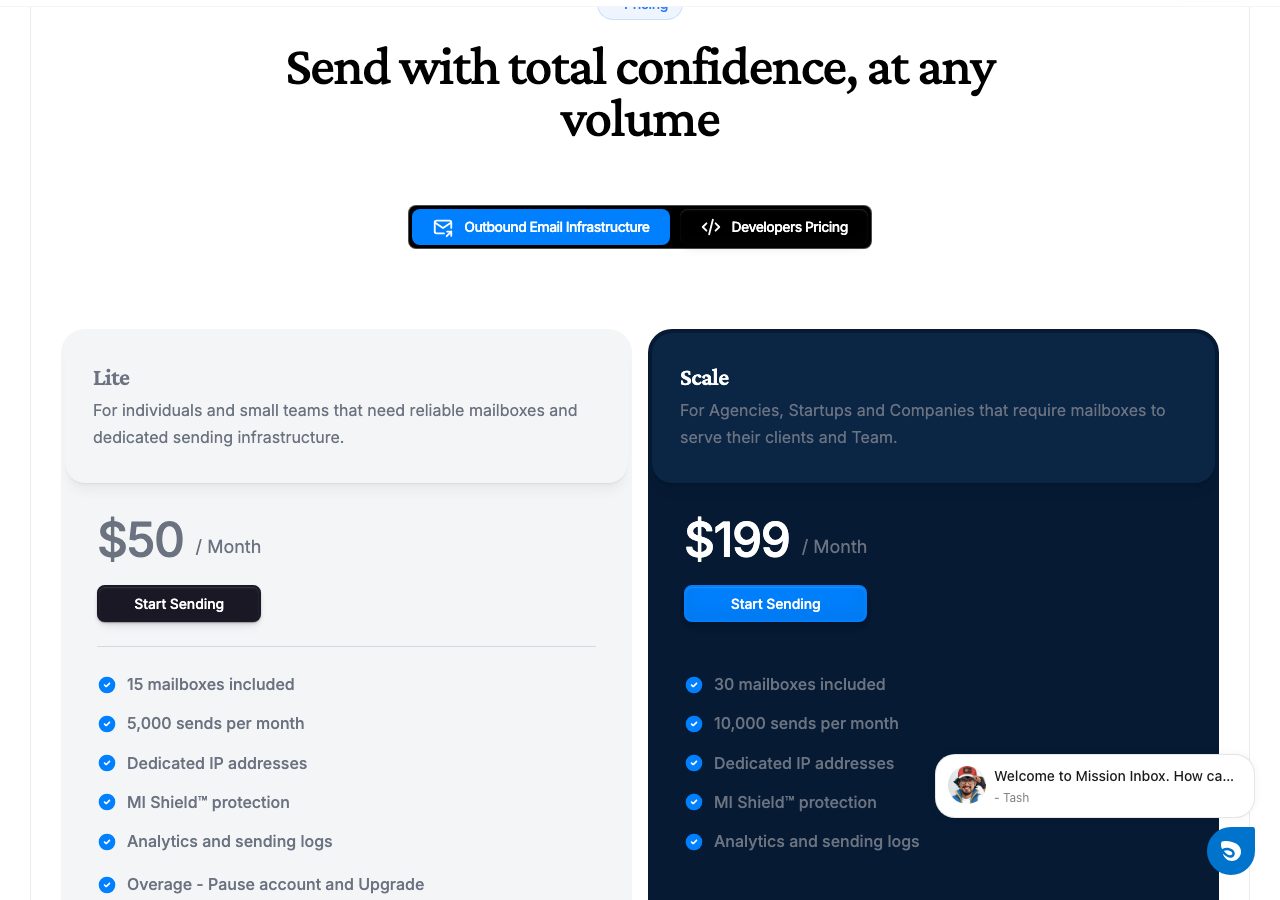
| Lite | $50 a month | 15 mailboxes, 5,000 sends, dedicated IPs, MI Shield | Hard stop at the limits; upgrade to go past them |
| Scale | $199 a month | 30 mailboxes, 10,000 sends, aged domains as an add-on | Extra mailboxes $3.00 down to $1.50; sends $1 per 1,000 |
| Warmup add-on | $0.50 per credit | 4 to 6 credits per mailbox per month, $2 to $3 | Calculator says 4 credits, billing policy says 6 |
| Pro (developers) | $99 a month | 5 domains, 100,000 API sends, mailboxes $2 flat | Transactional and product email, not cold outreach |
- Lite$50 a month
15 mailboxes, 5,000 sends, dedicated IPs, MI Shield
Hard stop at the limits; upgrade to go past them
- Scale$199 a month
30 mailboxes, 10,000 sends, aged domains as an add-on
Extra mailboxes $3.00 down to $1.50; sends $1 per 1,000
- Warmup add-on$0.50 per credit
4 to 6 credits per mailbox per month, $2 to $3
Calculator says 4 credits, billing policy says 6
- Pro (developers)$99 a month
5 domains, 100,000 API sends, mailboxes $2 flat
Transactional and product email, not cold outreach
What Mission Inbox does well
- Dedicated IPs and servers you do not share, so another sender's bad practice cannot drag down your reputation.
- MI Shield checks content, headers and DNS before every send, which is rare in this category and catches the campaign that would have burned a domain.
- Genuinely self-serve: sign up, create mailboxes in one click, automatic DNS, and connect to Instantly, Smartlead or Apollo in about ten minutes.
- The Lite plan at $50 for 15 mailboxes is an inexpensive way to test SMTP infrastructure next to Google or Microsoft accounts.
- One vendor for outbound mailboxes and transactional API sending, with a live deliverability dashboard included.
Where it falls short
- These are SMTP mailboxes on Mission Inbox's own servers, not Google Workspace or Microsoft 365 accounts, so they carry none of those providers' sender reputation.
- Warmup costs extra, $2 to $3 per mailbox per month in credits, and the two figures on the site disagree: the calculator says 4 credits, the billing policy says 6.
- Scale is $199 for 30 mailboxes, which is $6.63 each before warmup; the per-mailbox price only becomes competitive past a hundred mailboxes.
- Billing is strict: 30-day cycles, no proration, usage billed in arrears, a high-water-mark rule that charges your peak mailbox count, and refunds only inside a 2-day grace period.
- Send allowances are tight for the mailbox counts: 5,000 sends across 15 mailboxes on Lite is about 11 a day each, and Lite pauses the account at the limit.
PureMail score for Mission Inbox
Five criteria, 1 to 5 each, scored on what Mission Inbox publishes. How we score.
3.6 / 5
- Price and value
- 3 / 5
- Setup and control
- 5 / 5
- Deliverability foundations
- 3 / 5
- Terms and support
- 3 / 5
- Fit for cold email
- 4 / 5
Published prices, effective cost per mailbox at 10, 30 and 100, no hidden fees. Unpublished pricing scores 1.
Time to first send, DNS automation, domain options, sequencer connection, ownership of domains and mailboxes.
Mailbox type and its inherited reputation, IP policy, warmup path, replacement policy for blocked mailboxes.
Minimum order, billing flexibility, refund and cancellation terms, support channel and hours.
Built and permitted for outbound, integrations with sequencers, warmup and verification tools.
What Mission Inbox is
Mission Inbox is a self-serve email infrastructure platform that sells SMTP mailboxes on dedicated IP addresses for cold outreach, plus an API for transactional email. The company is Mission Inbox Inc. You create mailboxes from a dashboard, DNS is set up automatically, and the mailboxes connect to your sequencer; the site lists Instantly, Smartlead, Apollo, Outreach, Salesloft, Plusvibe and Emailbison, with HubSpot and Salesforce on the CRM side. It says teams sending more than 50 million emails a month run on it. That is the company’s figure.
The point to understand first is what the mailboxes are. They are not Google Workspace or Microsoft 365 accounts; Mission Inbox’s own FAQ says it replaces those. They are mailboxes on servers the company runs, with dedicated IPs that belong to your account alone. That buys you control of your own reputation and costs you the reputation Google and Microsoft lend to their tenants. The two other things that distinguish the product are MI Shield, an automated check of content, headers and DNS before every send, and a live deliverability dashboard that is included rather than sold as an add-on.
Mission Inbox pricing
Two plans cover outbound. Lite is $50 a month and includes 15 mailboxes, 5,000 sends, dedicated IPs, MI Shield and the analytics. It is a hard stop: reach 15 mailboxes or 5,000 sends and the account pauses until you upgrade. Scale is $199 a month and includes 30 mailboxes and 10,000 sends; past that it meters usage. Extra mailboxes cost $3.00 each from the 31st to the 1,000th, $2.25 up to 3,000, $1.75 up to 5,000 and $1.50 beyond, and extra sends cost $1 per 1,000. The homepage calls the Scale allowance “unlimited sends” with that dollar-per-thousand rate in the footnote. A third plan, Pro at $99, is for developers sending through the API: 5 domains, 100,000 sends and mailboxes at a flat $2, aimed at transactional and product email rather than cold outreach.
Warmup is the add-on that changes the arithmetic. It is not included in any plan and is billed in credits at $0.50 each, charged on every mailbox that has it enabled, including the ones inside your allowance. The site gives two rates: the pricing calculator says 4 credits per mailbox per month, which is $2, and the billing policy dated 1 January 2026 says 6 credits, which is $3. Budget on the higher figure until Mission Inbox reconciles them.
Put together, 15 mailboxes on Lite cost $50, or $3.33 each, rising to $80 to $95 with warmup. Thirty on Scale cost $199, or $6.63 each, before $60 to $90 of warmup. A hundred on Scale cost $199 plus 70 mailboxes at $3.00, which is $409, or $4.09 each, before $200 to $300 of warmup. The billing terms are strict and worth reading in full: cycles are 30 days with no proration, usage is collected in arrears on the next renewal, your billable mailbox count is the peak reached during the cycle even if you delete mailboxes later, and the subscription fee is refundable only inside a 2-day grace period. There is also a free trial, with another inconsistency: the homepage says no credit card is needed, while the billing policy says a payment method is required and the trial converts to a paid plan unless cancelled.
Setup and integrations
Setup is where Mission Inbox is strongest. There is no onboarding call and no credential handover: you sign up, create mailboxes in one click, DNS is configured automatically, and the site’s ten-minute claim is credible for a self-serve product. Mailboxes connect to the sequencers above over SMTP, and developers get an SMTP relay and an API with libraries for Node, Python, PHP, Ruby, Java and Go. Aged domains are available as an add-on on Scale. Note that the billing policy makes domain management a Pro-only feature, so ask how domains work on the outbound plans before you assume you can bring your own.
Deliverability and infrastructure
Dedicated IPs are the pitch, and for a team that has been hurt by a shared pool they are a real advantage: nobody else’s sending touches your reputation. MI Shield adds a layer most providers do not have, scanning each email before it leaves, and the dashboard shows placement and sending logs without a third-party tool. Against that, SMTP mailboxes start with no borrowed reputation, which is why warmup is not optional here, and the send allowances are modest: 5,000 sends across 15 mailboxes is about 11 a day each, and 10,000 across 30 is the same. Anything beyond that is metered on Scale and blocked on Lite.
Who Mission Inbox is for, and who should look elsewhere
Mission Inbox suits agencies and sales teams that want to own their sending reputation outright, like a self-serve dashboard with pre-send checks, and send enough volume to justify the $199 base. It is also a sensible way to run transactional and outbound email through one vendor.
It is a weaker fit for teams running 10 to 100 inboxes who want Google or Microsoft accounts at a flat per-inbox price, and for anyone who finds a two-day refund window and peak-count billing uncomfortable. Mailreef sells a dedicated SMTP server with unlimited mailboxes for teams at higher volume, Maildoso sells SMTP mailboxes individually for far less per mailbox, and ScaledMail builds mixed Google, Microsoft and SMTP fleets to a daily target. The inbox provider comparison puts them side by side.
Where PureMail is cheaper, and where Mission Inbox wins
Google Workspace and Microsoft 365 inboxes from PureMail cost $3.30 each for 10, $3.10 for 30 to 100 and $2.90 for 101 or more, per calendar month, with SPF, DKIM, DMARC and MX configured and the sequencer connection done in about four hours. Against Mission Inbox’s $3.33 for exactly 15 mailboxes, $6.63 at 30 and $4.09 at 100, that is less per inbox at every size most teams run, and the inboxes carry the sender reputation of Google and Microsoft themselves. Neither of us bundles warmup; Mission Inbox charges $2 to $3 a mailbox for it. Full details are on the pricing page.
Mission Inbox wins on control and speed: dedicated IPs you do not share, a check on every email before it sends, a live dashboard, a ten-minute self-serve setup, and an API for transactional mail on the same platform. Past a few hundred mailboxes its $1.50 to $2.25 tiers also undercut anyone selling real Google or Microsoft accounts. The table below puts the two side by side.
PureMail vs Mission Inbox
We sell inboxes too, so read this as one vendor's table built from published prices on both sides, not a neutral verdict.
| PureMail | Mission Inbox | |
|---|---|---|
| Price per mailbox | $2.9 (101+ inboxes), $3.1 (30–100), $3.3 (10) | From $3.33 per mailbox / month on Lite ($50 for 15); Scale works out at $6.63 at 30 mailboxes and $4.09 at 100 |
| Mailbox types | Google Workspace and Microsoft 365 | SMTP |
| Minimum order | 10 inboxes | None; Lite starts with 15 included mailboxes |
| Setup time | About 4 hours | About 10 minutes, self-serve, with automatic DNS |
| DNS setup | SPF, DKIM, DMARC and MX configured for you | Automatic DNS on their own sending infrastructure |
| IP location | US IPs | Dedicated IPs per account; location not stated |
| Warmup | Not bundled; warm up in your sending tool | Paid add-on billed in credits: $2 to $3 per mailbox per month |
| Domains | Bring your own from any registrar (GoDaddy, Namecheap, Cloudflare, Porkbun) | Aged domains sold as an add-on on Scale; domain management is a Pro-only feature per the billing policy |
Price per mailbox
PureMail: $2.9 (101+ inboxes), $3.1 (30–100), $3.3 (10)
Mission Inbox: From $3.33 per mailbox / month on Lite ($50 for 15); Scale works out at $6.63 at 30 mailboxes and $4.09 at 100
Mailbox types
PureMail: Google Workspace and Microsoft 365
Mission Inbox: SMTP
Minimum order
PureMail: 10 inboxes
Mission Inbox: None; Lite starts with 15 included mailboxes
Setup time
PureMail: About 4 hours
Mission Inbox: About 10 minutes, self-serve, with automatic DNS
DNS setup
PureMail: SPF, DKIM, DMARC and MX configured for you
Mission Inbox: Automatic DNS on their own sending infrastructure
IP location
PureMail: US IPs
Mission Inbox: Dedicated IPs per account; location not stated
Warmup
PureMail: Not bundled; warm up in your sending tool
Mission Inbox: Paid add-on billed in credits: $2 to $3 per mailbox per month
Domains
PureMail: Bring your own from any registrar (GoDaddy, Namecheap, Cloudflare, Porkbun)
Mission Inbox: Aged domains sold as an add-on on Scale; domain management is a Pro-only feature per the billing policy
See PureMail's Google Workspace and Microsoft 365 inboxes for cold email and the full pricing.
Mission Inbox alternatives we have reviewed
Mailreef
Dedicated SMTP mail server with unlimited mailboxes and a dedicated IP, $240 to $249 a month plus $0.001 per send. Built for 20K+ emails a month.
Maildoso
SMTP mailboxes for cold email at $2.50 each for 30, $0.75 for 300 and $0.49 for 1,000, each capped at 15 cold emails a day.
ScaledMail
Managed cold email packages built to your volume: Google Workspace at $3.50 a mailbox, Outlook at $50 a domain (25 mailboxes), SMTP at $3.75 a domain.
Mission Inbox FAQ
How much does Mission Inbox cost?
As of 5 October 2026, the Lite plan is $50 a month for 15 mailboxes and 5,000 sends, and the Scale plan is $199 a month for 30 mailboxes and 10,000 sends. On Scale, extra mailboxes cost $3.00 each up to 1,000, then $2.25, $1.75 and $1.50 in higher bands, and extra sends cost $1 per 1,000. Warmup is a separate add-on billed in credits at $0.50 each.
Are Mission Inbox mailboxes Google Workspace or Microsoft 365 accounts?
No. Mission Inbox runs its own sending servers and gives each account dedicated IP addresses, and its FAQ says it replaces Google Workspace or Microsoft 365 rather than reselling them. The mailboxes connect to sequencers such as Instantly, Smartlead and Apollo over SMTP, and the same platform offers an API for transactional email.
How much does Mission Inbox warmup cost?
Warmup is not included in any plan. It is billed in credits at $0.50 each. The pricing calculator quotes 4 credits per mailbox per month, which is $2, while the billing policy dated 1 January 2026 quotes 6 credits, which is $3. Warmup is charged on every mailbox that has it enabled, including the ones inside your plan allowance.
What are Mission Inbox's billing and refund terms?
Subscriptions renew every 30 days and are not prorated. Usage above your allowance is billed in arrears on the next renewal, and the billable mailbox count is your peak during the cycle, so removing mailboxes mid-cycle does not reduce the charge. The subscription fee is refundable only within a 2-day grace period; usage charges are never refunded.
Is Mission Inbox cheaper than PureMail?
Not at the sizes most teams run. Lite is $3.33 per mailbox for exactly 15 mailboxes, and Scale is $6.63 per mailbox at 30 and about $4.09 at 100, before warmup at $2 to $3 each. PureMail charges $3.30 per inbox for 10, $3.10 for 30 to 100 and $2.90 for 101 or more for Google Workspace and Microsoft 365 accounts. Mission Inbox gets cheaper per mailbox in the hundreds, and it sells dedicated IPs and pre-send checks that PureMail does not.
Sources
Disclosure: PureMail sells Google Workspace and Microsoft 365 inboxes and competes with some tools in this directory. We do not assign star ratings and we do not take payment for placement. Spotted an error? Email [email protected] and we will correct it within a week.
More tools in the directory
Aerosend
Managed private-server inboxes for cold email at $4 a month each for the first 150 and $2 after, in batches of 30 with warmup, placement tests and burn alerts.
Cheap Inboxes
Google Workspace and Microsoft inboxes at $3.50 a month each, $3.25 from 100, $3 from 250 and $2.80 from 1,000, with domains from $2.50 a year.
ColdInfra
Done-for-you Google Workspace and Microsoft 365 inboxes at $3 a month each from 10, $2.80 from 30 and $2.50 from 100, plus a setup fee of $24.99 to $54.99.
Setup guides from PureMail
How to Set Up SPF, DKIM and DMARC for Cold Email Domains
Step-by-step SPF, DKIM and DMARC setup for cold email domains on Google Workspace and Microsoft 365, plus the mistakes that quietly kill deliverability.