InboxKit review (2026): pricing, pros and cons, alternatives
InboxKit sells Google Workspace and Microsoft 365 mailboxes at $3 a month each, $2.50 on annual billing, with no minimum. Verified prices, pros and cons.
InboxKit at a glance
Facts checked Oct 6, 2026 on inboxkit.com
- Price
- From $2.50 per mailbox per month on annual billing, $2.70 quarterly, $3 monthly; same price for Google and Microsoft; no minimum
- Pricing model
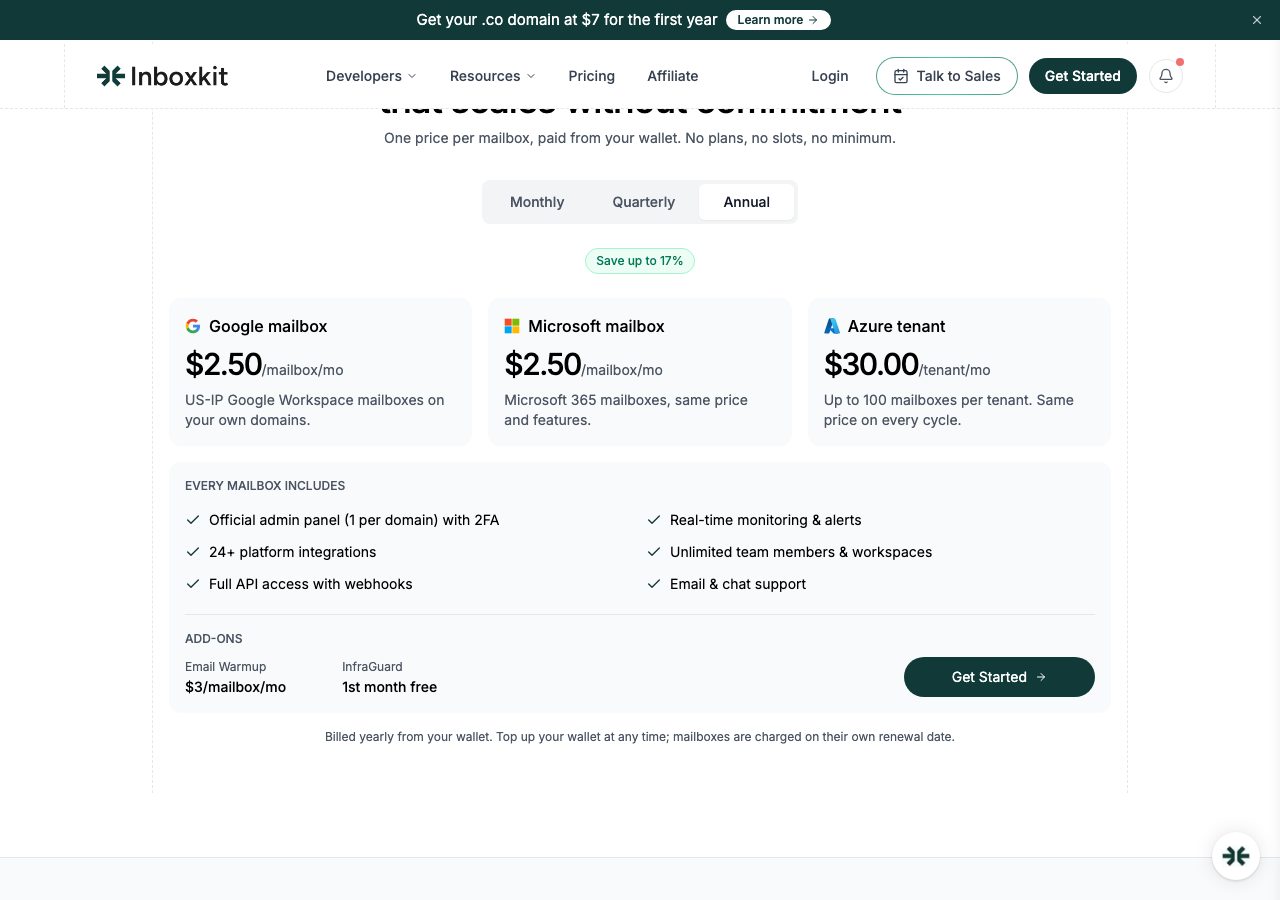
- One flat rate per mailbox at any volume, for Google Workspace or Microsoft 365: $3 a month on monthly billing, $2.70 on quarterly, $2.50 on annual. No plans, slots, minimum or setup fee. Azure tenants cost $30 a month each for up to 100 Microsoft 365 mailboxes. You top up a wallet and each mailbox is charged from it on its own renewal date. Domains are sold separately, billed yearly, at prices shown in the app. Add-ons: warmup at $3 a mailbox a month, and InfraGuard monitoring priced per domain with the first month free. The calculator page says pricing moves to a custom quote past 200 mailboxes.
- Minimum order
- None; one mailbox
- Free trial
- None; InfraGuard's first month is free, and a launch offer gives the first 100 Azure customers their first 100 mailboxes free
- Billing
- Monthly, quarterly or annual, drawn from a prepaid wallet; cancel a mailbox before its renewal date; fees, top-ups and domains are non-refundable
- Mailbox types
- Google Workspace, Microsoft 365
- Setup time
- Automated; the FAQ says orders complete in 30 to 120 minutes, the homepage says 10 minutes
- DNS setup
- SPF, DKIM and DMARC configured automatically, with an official admin panel and 2FA for each domain
- IP location
- US IPs on Google's and Microsoft's own infrastructure; Azure tenants for the Azure option
- Warmup
- Add-on at $3 a mailbox a month, ramping from 2 to 40 emails a day; the homepage comparison table lists warmup as built in
- Replacements
- Not stated; cancel a mailbox before its renewal date to stop the charge
- Domains
- Buy in the app, billed yearly and non-refundable, about one domain for every 3 mailboxes; or bring your own
- Integrations
- Instantly, Smartlead, Apollo, Reply, Lemlist, Salesforge, Plusvibe, API and webhooks
Best for: Agencies and self-serve teams that want the cheapest official Google and Microsoft accounts with admin access, an API and monitoring, and are comfortable prepaying a wallet.
Not for: Teams that want a person to set everything up and connect it, warmup included in the price, or a refund if something goes wrong.

InboxKit pricing
Published prices as of Oct 6, 2026 from their pricing page. Prices change; check before you buy.
| Plan | Price | What you get | Notes |
|---|---|---|---|
| Google mailbox | $3 a month | US-IP Google Workspace account, admin panel, DNS, API, integrations | $2.70 quarterly, $2.50 annual |
| Microsoft mailbox | $3 a month | Microsoft 365 account, same features | $2.70 quarterly, $2.50 annual |
| Azure tenant | $30 a month | Up to 100 Microsoft 365 mailboxes on one Azure tenant | Same price on every cycle |
| Add-ons | $3 a mailbox | Warmup $3 a mailbox a month; InfraGuard monitoring priced per domain | InfraGuard first month free |
- Google mailbox$3 a month
US-IP Google Workspace account, admin panel, DNS, API, integrations
$2.70 quarterly, $2.50 annual
- Microsoft mailbox$3 a month
Microsoft 365 account, same features
$2.70 quarterly, $2.50 annual
- Azure tenant$30 a month
Up to 100 Microsoft 365 mailboxes on one Azure tenant
Same price on every cycle
- Add-ons$3 a mailbox
Warmup $3 a mailbox a month; InfraGuard monitoring priced per domain
InfraGuard first month free
What InboxKit does well
- The lowest flat rate we have seen for official Google Workspace and Microsoft 365 accounts: $3 a month for one mailbox or five hundred, $2.50 on annual billing, with no minimum.
- Admin panel access with 2FA on every domain, so the accounts are yours to administer, plus app passwords for any SMTP tool.
- An API with webhooks, bulk setup from a CSV, unlimited team members and workspaces, and more than 24 sequencer integrations.
- Azure tenants at $30 a month for up to 100 Microsoft 365 mailboxes, the cheapest Microsoft option per inbox in this directory.
- Monitoring built around deliverability: blacklist checks every 6 hours, a DNS watchdog, bounce tracking and placement tests through InfraGuard, first month free.
Where it falls short
- Everything is prepaid into a wallet, and top-ups, mailbox fees and domains are non-refundable; an unused balance is forfeited if you close the account.
- Warmup costs $3 a mailbox a month extra, which doubles the price of a warming mailbox, although the homepage comparison table lists warmup as built in.
- The site disagrees with itself: the pricing page promises one flat rate at any volume, the calculator page describes price bands and a custom quote past 200 mailboxes, and setup is 10 minutes on one page and 30 to 120 minutes on another.
- Domain prices and the InfraGuard price are not published; both appear only inside the app.
- The 90 percent inbox rate, the 4.9 and 4.8 ratings and the claim to be the only Google Cloud partner in this space are the company's own figures.
PureMail score for InboxKit
Five criteria, 1 to 5 each, scored on what InboxKit publishes. How we score.
4.2 / 5
- Price and value
- 5 / 5
- Setup and control
- 5 / 5
- Deliverability foundations
- 4 / 5
- Terms and support
- 2 / 5
- Fit for cold email
- 5 / 5
Published prices, effective cost per mailbox at 10, 30 and 100, no hidden fees. Unpublished pricing scores 1.
Time to first send, DNS automation, domain options, sequencer connection, ownership of domains and mailboxes.
Mailbox type and its inherited reputation, IP policy, warmup path, replacement policy for blocked mailboxes.
Minimum order, billing flexibility, refund and cancellation terms, support channel and hours.
Built and permitted for outbound, integrations with sequencers, warmup and verification tools.
What InboxKit is
InboxKit is a self-serve email infrastructure platform that provisions official Google Workspace and Microsoft 365 accounts on your domains, with US IPs, and more recently Microsoft 365 mailboxes on dedicated Azure tenants. It is operated by Enrich Labs FZ LLC, the company behind the Enrich.so data tools. Its pitch is price and control: one flat rate per mailbox with no plans or minimums, an official admin panel for every domain, an API, and monitoring that watches blacklists, DNS and bounces around the clock. The site cites a 90 percent inbox rate, ratings of 4.9 and 4.8, and customers from Smartlead and HeyReach to PwC and Zendesk; those are the company’s figures.
InboxKit pricing
The pricing page is unusually simple. A Google Workspace or Microsoft 365 mailbox costs $3 a month on monthly billing, $2.70 on quarterly and $2.50 on annual, and the FAQ is explicit that one mailbox and five hundred cost the same per mailbox. There is no setup fee, no slot and no minimum. Azure tenants cost $30 a month each for up to 100 mailboxes, the same on every billing cycle, and the Azure page says the first 100 customers get their first 100 mailboxes free.
Billing runs through a wallet. You top it up by card, and each mailbox is charged from the balance on its own renewal date, which is tidy for agencies adding mailboxes at different times. The refund policy is the price of that convenience: fees are billed in advance and non-refundable, wallet top-ups cannot be refunded once added, domains are never refundable, and an unused balance is forfeited if you close the account. Cancel a mailbox before its renewal date and it simply stops. Agencies can ask for invoiced NET-30 terms.
Two numbers the page does not show: domains, which are bought in the app and billed yearly, and InfraGuard, the monitoring suite, which is priced per domain with the first month free. Warmup is an add-on at $3 a mailbox a month. And the site is not consistent with itself. The pricing page promises one flat rate at any volume, but the mailbox calculator page still describes price bands, with $3.25 a mailbox quoted for 30 to 99, and says pricing moves to a custom quote past 200 mailboxes or 10 Azure tenants. Trust the pricing page and confirm in the app.
Setup and integrations
Setup is automated. Connect or buy a domain, and InboxKit writes SPF, DKIM and DMARC, creates the admin panel with 2FA, generates app passwords and connects the mailboxes to your sequencer. The homepage says ready in 10 minutes; the FAQ says orders complete in 30 to 120 minutes and that the automation also adds profile pictures and makes accounts public. Bulk setup takes a CSV and fills in the details for you. The API covers mailboxes and domains with webhook events, there are unlimited team members and workspaces, and the integrations list runs to more than 24 tools including Instantly, Smartlead, Apollo, Reply, Lemlist, Salesforge and Plusvibe.
Deliverability and monitoring
Because these are official Google and Microsoft accounts on US IPs, they start with the reputation those providers lend their own tenants, and the per-domain admin panel keeps one burned domain from touching the others. The calculator’s own defaults are telling about volumes: about 15 emails a day per Google mailbox and 5 per Microsoft mailbox, with 3 mailboxes per domain. InfraGuard adds blacklist checks every 6 hours, a DNS watchdog, bounce tracking and inbox placement tests, and weekly reports land in your inbox. Warmup, when you pay for it, ramps each mailbox from 2 to 40 emails a day on an isolated schedule.
Who InboxKit is for, and who should look elsewhere
InboxKit suits agencies and self-serve teams that want the cheapest official Google and Microsoft accounts with admin access, an API and monitoring, and that are comfortable prepaying a wallet. It is a poor fit for teams that want a person to do the setup and the sequencer connection, for anyone who expects warmup in the price, and for anyone who wants a refund route if something goes wrong. Zapmail sells Google and Microsoft inboxes with a similar self-serve model, Hypertide automates Google inboxes with no minimum and Entra domains at about $1 an inbox, and Primeforge sells the same account types as slots at a higher price. The inbox provider comparison scores all of them.
Where PureMail is cheaper, and where InboxKit wins
PureMail’s Google Workspace and Microsoft 365 inboxes, set up and connected for you cost $3.30 each for 10, $3.10 for 30 to 100 and $2.90 for 101 or more, billed monthly with no wallet to prepay, with SPF, DKIM, DMARC and MX configured and the sequencer connected by our team in about four hours. Against InboxKit’s $3 monthly rate, PureMail is 30 cents dearer per inbox at 10, 10 cents dearer at 30 to 100 and 10 cents cheaper from 101 inboxes: a 200-inbox order is $580 a month against $600. What you are paying for below that line is the done-for-you setup and a team to call. Full details are on the pricing page.
InboxKit wins on price the moment you pay annually: $2.50 a mailbox undercuts every PureMail tier, at the cost of a year prepaid into a non-refundable wallet. It also wins on control and tooling: an admin panel per domain, an API with webhooks, bulk CSV setup, the Azure tenant option at $30 for up to 100 mailboxes, and monitoring that most resellers do not offer. If you run infrastructure yourself and buy in volume, it is the best value in resold Google and Microsoft accounts we have reviewed. The table below puts the two side by side.
PureMail vs InboxKit
We sell inboxes too, so read this as one vendor's table built from published prices on both sides, not a neutral verdict.
| PureMail | InboxKit | |
|---|---|---|
| Price per mailbox | $2.9 (101+ inboxes), $3.1 (30–100), $3.3 (10) | From $2.50 per mailbox per month on annual billing, $2.70 quarterly, $3 monthly; same price for Google and Microsoft; no minimum |
| Mailbox types | Google Workspace and Microsoft 365 | Google Workspace, Microsoft 365 |
| Minimum order | 10 inboxes | None; one mailbox |
| Setup time | About 4 hours | Automated; the FAQ says orders complete in 30 to 120 minutes, the homepage says 10 minutes |
| DNS setup | SPF, DKIM, DMARC and MX configured for you | SPF, DKIM and DMARC configured automatically, with an official admin panel and 2FA for each domain |
| IP location | US IPs | US IPs on Google's and Microsoft's own infrastructure; Azure tenants for the Azure option |
| Warmup | Not bundled; warm up in your sending tool | Add-on at $3 a mailbox a month, ramping from 2 to 40 emails a day; the homepage comparison table lists warmup as built in |
| Domains | Bring your own from any registrar (GoDaddy, Namecheap, Cloudflare, Porkbun) | Buy in the app, billed yearly and non-refundable, about one domain for every 3 mailboxes; or bring your own |
Price per mailbox
PureMail: $2.9 (101+ inboxes), $3.1 (30–100), $3.3 (10)
InboxKit: From $2.50 per mailbox per month on annual billing, $2.70 quarterly, $3 monthly; same price for Google and Microsoft; no minimum
Mailbox types
PureMail: Google Workspace and Microsoft 365
InboxKit: Google Workspace, Microsoft 365
Minimum order
PureMail: 10 inboxes
InboxKit: None; one mailbox
Setup time
PureMail: About 4 hours
InboxKit: Automated; the FAQ says orders complete in 30 to 120 minutes, the homepage says 10 minutes
DNS setup
PureMail: SPF, DKIM, DMARC and MX configured for you
InboxKit: SPF, DKIM and DMARC configured automatically, with an official admin panel and 2FA for each domain
IP location
PureMail: US IPs
InboxKit: US IPs on Google's and Microsoft's own infrastructure; Azure tenants for the Azure option
Warmup
PureMail: Not bundled; warm up in your sending tool
InboxKit: Add-on at $3 a mailbox a month, ramping from 2 to 40 emails a day; the homepage comparison table lists warmup as built in
Domains
PureMail: Bring your own from any registrar (GoDaddy, Namecheap, Cloudflare, Porkbun)
InboxKit: Buy in the app, billed yearly and non-refundable, about one domain for every 3 mailboxes; or bring your own
See PureMail's Google Workspace and Microsoft 365 inboxes for cold email and the full pricing.
InboxKit alternatives we have reviewed
Zapmail
Self-serve Google Workspace and Microsoft 365 mailboxes with automated DNS and OAuth export to 50+ sequencers. Plans start at $39 for 10 mailboxes.
Hypertide
Automated cold email infrastructure: Google inboxes at $3.30 each with no minimum, Entra domains at $25 a month for 25 inboxes, $500 opening credit.
Primeforge
Google Workspace and Microsoft 365 mailboxes from the Salesforge family: $4.50 a slot a month, $3.75 billed yearly, 10-slot minimum, domains $14 a year.
InboxKit FAQ
How much does InboxKit cost?
As of 6 October 2026, Google Workspace and Microsoft 365 mailboxes cost $3 a month each on monthly billing, $2.70 on quarterly and $2.50 on annual, at any volume and with no minimum. Azure tenants cost $30 a month for up to 100 Microsoft 365 mailboxes. Domains are billed yearly at prices shown in the app, warmup is $3 a mailbox a month, and InfraGuard monitoring is priced per domain with the first month free.
How does InboxKit billing work, and can I get a refund?
You top up a wallet by card and each mailbox is charged from it on its own renewal date. The refund policy says fees are billed in advance and are non-refundable, wallet top-ups are non-refundable once added, domains are never refundable, and any balance left when you close the account is forfeited. You can cancel a mailbox before its renewal date to avoid the next charge, and agencies can ask for invoiced NET-30 billing.
What are InboxKit Azure mailboxes?
Microsoft 365 mailboxes provisioned on a Microsoft Azure tenant that InboxKit creates for your domain, at $30 a month for up to 100 mailboxes, whether you create 25, 50 or 100. InboxKit says they are live in one to two hours with DNS, warmup and monitoring handled, and a launch offer gives the first 100 customers their first 100 mailboxes free. Past 10 tenants the calculator page says pricing is quoted.
Is warmup included with InboxKit?
No. The pricing page lists Email Warmup as an add-on at $3 a mailbox a month, which ramps each mailbox from 2 to 40 emails a day on its own schedule. The homepage's comparison table marks warmup as built in, so read that as available rather than included. Most teams warm up in their sequencer instead.
Is InboxKit cheaper than PureMail?
On annual billing, yes: $2.50 a mailbox undercuts every PureMail tier, with a year prepaid into a wallet. On monthly billing it is close. PureMail charges $3.30 per Google Workspace or Microsoft 365 inbox for 10, $3.10 for 30 to 100 and $2.90 for 101 or more, so InboxKit's $3 is 30 cents cheaper at 10, 10 cents cheaper at 30 to 100, and 10 cents dearer from 101 inboxes. PureMail's price includes a team doing the setup and the sequencer connection for you, and there is no wallet to prepay.
Sources
Disclosure: PureMail sells Google Workspace and Microsoft 365 inboxes and competes with some tools in this directory. We do not assign star ratings and we do not take payment for placement. Spotted an error? Email [email protected] and we will correct it within a week.
More tools in the directory
Aerosend
Managed private-server inboxes for cold email at $4 a month each for the first 150 and $2 after, in batches of 30 with warmup, placement tests and burn alerts.
Cheap Inboxes
Google Workspace and Microsoft inboxes at $3.50 a month each, $3.25 from 100, $3 from 250 and $2.80 from 1,000, with domains from $2.50 a year.
ColdInfra
Done-for-you Google Workspace and Microsoft 365 inboxes at $3 a month each from 10, $2.80 from 30 and $2.50 from 100, plus a setup fee of $24.99 to $54.99.
Setup guides from PureMail
How to Set Up SPF, DKIM and DMARC for Cold Email Domains
Step-by-step SPF, DKIM and DMARC setup for cold email domains on Google Workspace and Microsoft 365, plus the mistakes that quietly kill deliverability.