Mixmax review (2026): pricing by recipients, features, verdict
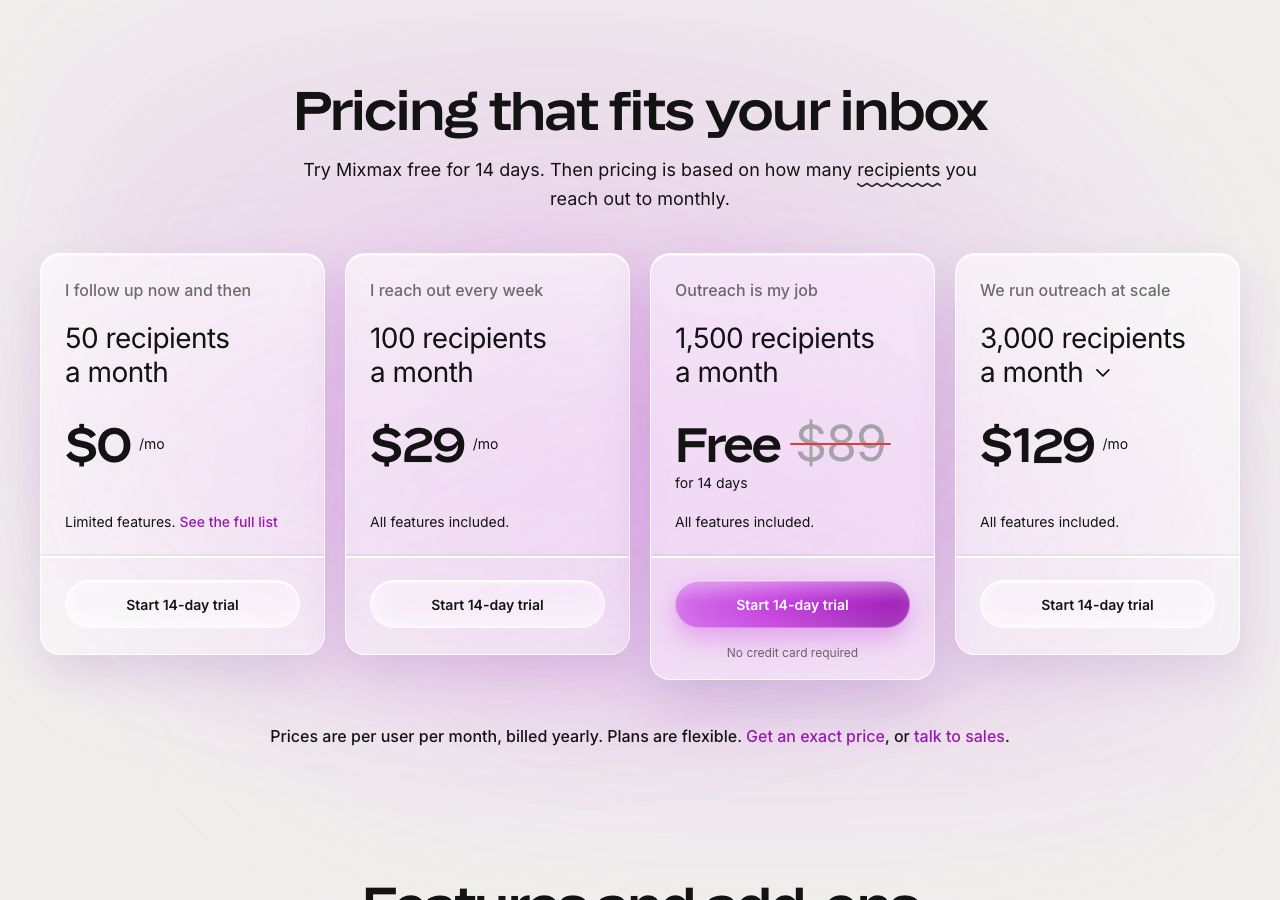
Mixmax pricing verified: free for 50 sequence recipients a month, then $29 a user a month for 100, $89 for 1,500, $129 for 3,000, $229 for 15,000, yearly.
Mixmax at a glance
Facts checked Oct 13, 2026 on mixmax.com
- Price
- From $29 per user per month billed yearly for 100 sequence recipients a month; $49 for 500, $89 for 1,500, $129 for 3,000, $159 for 5,000, $229 for 15,000; free for 50
- Pricing model
- One paid plan with every feature, priced per user by how many people each user adds to automated sequences in a calendar month. Free covers 50 recipients a month with limited features. Paid tiers, per user per month billed yearly, are $29 for 100 recipients, $49 for 500, $89 for 1,500, $129 for 3,000, $159 for 5,000 and $229 for 15,000. A recipient is a person added to a sequence, with every follow-up in that sequence included; the same contact in two sequences counts twice; counts reset each calendar month and do not roll over or pool across the team, though each person can sit on a different tier. The FAQ says annual billing saves 15% to 25% depending on tier against month-to-month, and billed monthly the calculator shows $34, $65, $105, $159, $195 and $279 for the same tiers. Add-ons, custom branding and domains, advanced workspace rules and Salesforce Insights, cost $9 a member a month billed yearly or $12 monthly; the dialer is $9 a member a month plus per-minute usage. The 14-day trial runs at the 1,500-recipient tier with every feature and no card.
- Minimum order
- None; the free plan covers 50 recipients a month
- Free trial
- 14 days at the 1,500-recipient tier, no card; falls back to the free plan afterwards
- Billing
- Monthly or yearly per user; cancel at any time, effective at the end of the current period; refunds reviewed case by case for monthly users who meant to cancel, no partial refunds on annual plans; upgrades immediate and prorated, downgrades at renewal
- Mailbox types
- Google Workspace
- Setup time
- Minutes: install the Gmail extension, connect the calendar, build a sequence
- DNS setup
- Not applicable; custom tracking and calendar domains are a $9 add-on
- IP location
- Not applicable; sends through the connected Gmail account
- Warmup
- Not offered
- Replacements
- Not applicable
- Domains
- Not supplied
- Integrations
- Gmail and Google Workspace, Salesforce, HubSpot, Slack, Zapier, LinkedIn steps, Dialpad, Mixmax API and MCP server
Best for: Gmail-based sales and customer teams that send personal sequences at modest volume and want tracking, scheduling and CRM logging in the inbox.
Not for: Cold email at volume from many inboxes; one Gmail account per user with no rotation or warmup is the wrong shape for it.

Mixmax pricing
Published prices as of Oct 13, 2026 from their pricing page. Prices change; check before you buy.
| Plan | Price | What you get | Extras | Notes |
|---|---|---|---|---|
| Free | $0 | 50 sequence recipients a month, limited features | — | No card |
| 100 recipients | $29 a user a month | All features: sequences, tracking, scheduling, CRM sync | — | Billed yearly |
| 1,500 recipients | $89 a user a month | All features | — | Billed yearly; 500 recipients $49 |
| 3,000 recipients | $129 a user a month | All features | — | Billed yearly; 5,000 $159; 15,000 $229 |
| Add-ons | $9 a member a month | Custom branding and domains, workspace rules, Salesforce Insights | $12 monthly | Dialer $9 plus usage |
- Free$0
50 sequence recipients a month, limited features
No card
- 100 recipients$29 a user a month
All features: sequences, tracking, scheduling, CRM sync
Billed yearly
- 1,500 recipients$89 a user a month
All features
Billed yearly; 500 recipients $49
- 3,000 recipients$129 a user a month
All features
Billed yearly; 5,000 $159; 15,000 $229
- Add-ons$9 a member a month
Custom branding and domains, workspace rules, Salesforce Insights
Extras: $12 monthly
Dialer $9 plus usage
What Mixmax does well
- Pricing by what you actually send: every feature on every paid tier, and the only variable is how many people each user adds to sequences a month.
- A real free plan for 50 recipients a month and a 14-day trial at the 1,500 tier with no card.
- Lives inside Gmail: sequences, tracking, templates, one-click scheduling, meeting notes and CRM logging without leaving the inbox.
- Fair billing in writing: cancel any time, upgrades prorated, and a policy of reviewing refunds for monthly users who forgot to cancel.
- SOC 2 Type II, SOC 3, GDPR and HIPAA safeguards, audited by Google for OAuth, on every plan including the trial.
Where it falls short
- Gmail only, and each user sends from one connected account, so there is no inbox rotation and no warmup; cold volume lands on that one mailbox.
- Recipients are counted per user, do not roll over and cannot be pooled, and a contact in two sequences counts twice.
- Monthly billing costs 15% to 25% more than yearly by tier, and the calculator only shows it once you move the reach slider.
- No partial refunds on annual plans, and downgrades only take effect at renewal.
- Custom tracking and calendar domains, which help deliverability, cost $9 a member a month extra.
PureMail score for Mixmax
Five criteria, 1 to 5 each, scored on what Mixmax publishes. How we score.
3.6 / 5
- Price and value
- 4 / 5
- Setup and control
- 4 / 5
- Deliverability foundations
- 3 / 5
- Terms and support
- 4 / 5
- Fit for cold email
- 3 / 5
Published prices, effective cost per mailbox at 10, 30 and 100, no hidden fees. Unpublished pricing scores 1.
Time to first send, DNS automation, domain options, sequencer connection, ownership of domains and mailboxes.
Mailbox type and its inherited reputation, IP policy, warmup path, replacement policy for blocked mailboxes.
Minimum order, billing flexibility, refund and cancellation terms, support channel and hours.
Built and permitted for outbound, integrations with sequencers, warmup and verification tools.
What Mixmax is
Mixmax is a sales engagement layer that lives inside Gmail: automated sequences of emails, calls, tasks and LinkedIn steps, email tracking, templates, one-click scheduling, AI meeting notes, CRM logging to Salesforce and HubSpot, and lately an MCP server so the same actions can be driven from Claude or ChatGPT. Mixmax, Inc. holds SOC 2 Type II and SOC 3 and is audited by Google for OAuth, and its pricing page claims more than a thousand five-star G2 reviews. For cold email it is a sequencer with a twist: it prices by the people you reach, not by features or seats alone.
Mixmax pricing explained
There is one paid plan with every feature, priced per user by how many people that user adds to sequences in a calendar month. Free covers 50 recipients a month with limited features. Paid tiers, per user per month billed yearly, are $29 for 100 recipients, $49 for 500, $89 for 1,500, $129 for 3,000, $159 for 5,000 and $229 for 15,000. A recipient is a person added to a sequence with all follow-ups included; the same contact in two sequences counts twice; counts reset each month and neither roll over nor pool, though team members can sit on different tiers. Upgrades are immediate and prorated, downgrades take effect at renewal. The FAQ says annual billing saves 15% to 25% against month-to-month depending on tier; billed monthly the calculator shows $34, $65, $105, $159, $195 and $279 for the same tiers. Add-ons, custom branding and domains, advanced workspace rules and Salesforce Insights, cost $9 a member a month billed yearly or $12 monthly, and the dialer is $9 a member a month plus per-minute usage. The 14-day trial runs at the 1,500 tier with no card.
The fair billing policy is readable and reasonable: cancel any time with access to the end of the period, refunds reviewed case by case for monthly users who meant to cancel or forgot and did not use the product, and no partial refunds on annual plans.
Sequences, tracking and the inbox
Everything happens in Gmail. Sequences send until someone replies, with tracking on every message, templates and snippets, polls, follow-up reminders, booking links and AI compose, and every send and reply logged to the CRM. Rules automate personal workflows, and workspace-wide rules such as round-robin assignment are an add-on. Delegated sending lets one person run outreach from a teammate’s address. Custom tracking and calendar domains, which keep links on your own domain, are the $9 add-on that matters most for deliverability.
What that means for cold email
Mixmax sends from one Gmail account per user, with no inbox rotation and no warmup. That suits personal outreach at a few hundred recipients a month per rep and does not suit a cold campaign to ten thousand contacts, which needs many inboxes on separate domains and a sequencer that rotates them. The recipient counting is fair for cold email in one respect: follow-ups are free, so a six-step sequence costs the same as a one-step one.
Who Mixmax is for, and who should look elsewhere
Mixmax suits Gmail-based sales and customer teams that send personal sequences at modest volume and want tracking, scheduling and CRM logging in the inbox. It is a poor fit for cold email at volume from many inboxes. Mailmeteor is the lighter Gmail mail-merge, lemlist the multichannel sequencer with warmup, and Smartlead and Instantly the cold email sequencers built around rotation. The sequencers category compares them. Yesware is the closest rival inside Gmail and Outlook, with a free plan and Pro from $19 a seat. Mailsuite (Mailtrack) is the budget Gmail tracker with mail merge to 60,000 recipients a month at $3.99 billed yearly.
Using Mixmax with PureMail
Connect a PureMail Google Workspace inbox on a separate outreach domain as the Gmail account a rep sends from, keep its sequence volume modest, and pay for the custom tracking domain add-on so links stay on your domain. Run the high-volume cold layer in a sequencer that rotates across the rest of the PureMail inboxes, and let Mixmax handle the personal follow-up.
Mixmax alternatives we have reviewed
Mailmeteor
Gmail and Outlook mail merge with a free plan of 500 emails a month, paid plans from $5.99 a user, and daily caps of 50 to 2,000 emails depending on the plan.
lemlist
Multichannel sequencer from Paris: Email plan at $69 a month for unlimited users and 50,000 emails ($55 yearly), Multichannel $109 a user ($87 yearly).
Smartlead
Cold email sequencer with unlimited mailboxes on every plan: $39, $94, $174 or $379 a month, 17% less yearly, warm-up free from Smart, mailboxes from $4.50.
Instantly
Cold email sequencer with unlimited inboxes and warmup on every plan: $47, $97 or $358 a month, 20% less yearly, plus done-for-you Google inboxes at $5.
Yesware
Gmail and Outlook sales email tool: free plan, Pro $19 a seat a month or $15 yearly, Premium $45 or $35 with unlimited campaigns, Enterprise $85 or $65.
Mailsuite (Mailtrack)
Gmail open tracking, formerly Mailtrack: free with a signature, Mailtrack $2.99 a user a month or $1.99 yearly, Mailsuite $5.99 or $3.99 with merge and PDFs.
Mixmax FAQ
How much does Mixmax cost?
As of 13 October 2026, Mixmax is free for 50 sequence recipients a month. Paid tiers include every feature and cost, per user per month billed yearly, $29 for 100 recipients, $49 for 500, $89 for 1,500, $129 for 3,000, $159 for 5,000 and $229 for 15,000. Add-ons are $9 a member a month yearly or $12 monthly, and the dialer is $9 a member a month plus per-minute usage.
What counts as a recipient in Mixmax?
Each person a user adds to an automated sequence in a calendar month. Every follow-up in that sequence is included, so a five-step sequence to one person counts once; emails sent outside sequences do not count; the same contact in two sequences counts twice. Counts reset monthly, unused recipients do not roll over, and they are bought per user rather than pooled across a team.
Does Mixmax have a free trial?
Yes. The 14-day trial includes every feature at the 1,500-recipient tier and asks for no payment details. When it ends you either pick a recipient tier and keep everything, or drop to the free plan with 50 recipients a month and limited features; your workspace and data stay intact either way.
Can I cancel Mixmax and get a refund?
You can cancel at any time from the product or by emailing support, effective at the end of the current monthly or annual period, with access until then. Mixmax reviews refund requests case by case, for example a monthly user charged just after intending to cancel, or one who forgot to cancel and has not used the product; it does not give partial refunds on annual plans.
Can I run cold email from Mixmax with PureMail inboxes?
At low volume. Each Mixmax user sends from one connected Gmail account, with no rotation or warmup, so connect a PureMail Google Workspace inbox on a separate domain as that account and keep its sequence volume modest. For campaigns across many inboxes, run the cold layer in a sequencer with rotation and keep Mixmax for the personal follow-up.
Sources
Disclosure: PureMail sells Google Workspace and Microsoft 365 inboxes and competes with some tools in this directory. We do not assign star ratings and we do not take payment for placement. Spotted an error? Email [email protected] and we will correct it within a week.
More tools in the directory
Amplemarket
All-in-one outbound platform: Startup $600 a month on an annual term for 2 users, 27,000 contacts and 13,500 email credits a user; Growth and Elite custom.
EmailBison
Infrastructure-first cold email sequencer: one $599-a-month plan covers 500,000 emails on dedicated IPs with warm-up, API and unlimited users, sold by demo.
Emailchaser
Instantly-priced sequencer with unlimited accounts, warm-up and lead credits: Starter $47 a month, Pro $97, Max $358, Enterprise $897; in-app mailboxes $6.
Setup guides from PureMail
How to Set Up SPF, DKIM and DMARC for Cold Email Domains
Step-by-step SPF, DKIM and DMARC setup for cold email domains on Google Workspace and Microsoft 365, plus the mistakes that quietly kill deliverability.